Modifiers
Let you alter movements in various ways.
Kill Pitch
The Kill Pitch options let you remove the pitch axis on the left or right knees and elbows.
Roll
The settings in the Roll group adjust the roll of arms and legs, and work with the optional roll bones defined in the Roll group of slots (see Roll).
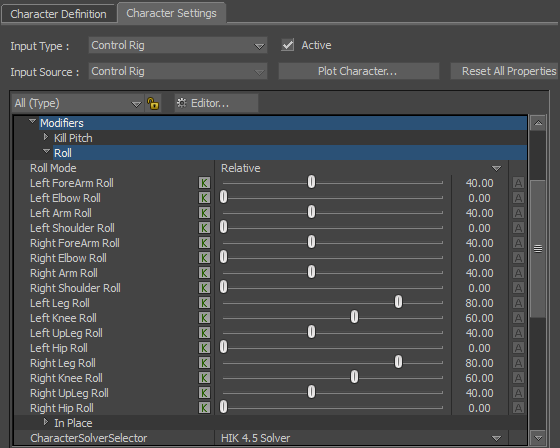
Roll Mode
Lets you select the Absolute or Relative mode.
- Relative mode — takes care of HIK-generated Roll amounts
- Absolute mode — takes care of both user generated and HIK-generated Roll amounts
The rest of the Roll settings let you specify the bones that receive a percentage of the roll axis movement. For example, if the forearm of your model includes a roll bone, you can transfer part of the roll animation onto the roll bone using the Left or Right ForeArm Roll setting.
To specify how much of the roll transfers from the limb to the roll object (the default setting is 60%), set a percentage using the following guidelines:
- At 100%, all of the roll transfers from the original limb to the roll bone, moving the roll bone and its parent.
- At 50%, the roll is equally distributed between the limb and the roll bone.
- At 0%, none of the roll is transferred to the rest of the limb, moving only the roll bone.
In Place
When the In Place options are activated, you can lock the overall translation of the animation of a character on any axis. This lets you visualize a smooth loop of sequences such as walk cycles without having the character jump from one position to another as the play cursor reaches the end of the timeline.
Lock X
Locks the translation of the animation of a character on the X-axis.
Lock Y
Locks the translation of the animation of a character on the Y-axis.
Lock Z
Locks the translation of the animation of a character on the Z-axis.