Import Data from a Primavera Project
Note: This procedure shows how to import data from a Primavera P6 project. Follow the same steps to import data from a Primavera P6 V7, V8 or V8.2 project, selecting the Primavera P6 V7, V8, or V8.2 options where applicable.
Click Home tab > Tools panel > TimeLiner
 .
.In the TimeLiner window > Data Sources tab, click the Add button and click Primavera P6 (Web Services).
Note: If you can’t see this option, you must set up a Primavera Web Server first. Refer to the Primavera P6 Web Server Administrator Guide (available in your Primavera documentation).When the Primavera login dialog box is displayed, enter your user name, password, and the server address.
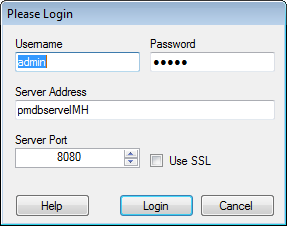 Tip: The Server Address is the name of a machine on your domain or an IP address for the server.
In the Primavera P6 Database Instance Selection dialog box double-click the desired Instance ID to select it.
In the Primavera P6 Project Selection dialog box double-click the desired project file to open it.
Use the Field Selector Dialog Box to override some of the predefined data import options.
TimeLiner connects to the selected project file.
You are now ready to To Build Tasks from a Data Source.