Copy Design – Select Numbering Schemes
Select Numbering Schemes to set which naming schemes are valid for use in your copy design configuration.
As a Vault administrator, you can:
Set a default numbering scheme stored on the server and apply it to all users currently logged in to Vault.
Mark numbering schemes as Shown so that they appear as options in the Numbering Schemes to all users currently logged in to Vault.
Note: See Create Numbering Schemes for more information on creating and customizing numbering schemes.
-
Note: If you are not already logged in, you are prompted to log into a vault. Enter your credentials and click OK.
In the toolbar, click Options > Numbering Scheme > Configure
 to open the Numbering Schemes dialog.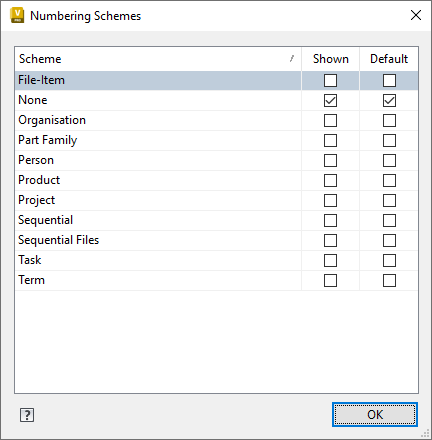
Select the Shown check box for any numbering scheme you want to display as a view button in the Numbering Schemes Panel.
Select the Default check box to set a Numbering Scheme as the default setting.
Click OK.
Note: Users without permission to set the default or configure the numbering scheme cannot make changes.