Unwrap_UVW モディファイヤ - 通常(展開)マッピング
以下のメソッドは、展開マッピング ワークフローを MAXScript に公開します。
展開マッピング
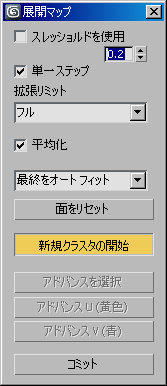
メソッド:
<void><Unwrap_UVW>.RegularMapStart <node>node <boolean>showUI指定したノードの展開マッピング処理を開始します。第 2 引数に true が渡された場合、[展開マップ](Unfold Map)ダイアログも表示します。
3ds Max 2012 以降では、unwrap6 インタフェースによって公開されます。
<void><Unwrap_UVW>.RegularMapEnd()展開マッピング処理を終了し、[展開マップ](Unfold Map)ダイアログが開いている場合は閉じます。
3ds Max 2012 以降では、unwrap6 インタフェースによって公開されます。
<void><Unwrap_UVW>.RegularMapReset()展開マッピングをリセットします。
3ds Max 2012 以降では、unwrap6 インタフェースによって公開されます。
<boolean><Unwrap_UVW>.RegularMapGetAutoWeld()[しきい値を使用](Use Threshold)チェックボックスの状態を返します。
3ds Max 2012 以降では、unwrap6 インタフェースによって公開されます。
<void><Unwrap_UVW>.RegularMapSetAutoWeld <boolean>enable[しきい値を使用](Use Threshold)チェックボックスの状態を設定します。
3ds Max 2012 以降では、unwrap6 インタフェースによって公開されます。
<float><Unwrap_UVW>.RegularMapGetAutoWeldThreshold()自動連結の[しきい値] (Threshold)の値を返します。
3ds Max 2012 以降では、unwrap6 インタフェースによって公開されます。
<void><Unwrap_UVW>.RegularMapSetAutoWeldThreshold <float>threshold自動連結の[しきい値] (Threshold)の値を設定します。[展開マップ](Unfold Map)ダイアログの UI は、再度開かれるまで更新されません。
3ds Max 2012 以降では、unwrap6 インタフェースによって公開されます。
<boolean><Unwrap_UVW>.RegularMapGetSingleStep()[単一ステップ](Single Step)オプションの状態を返します。
3ds Max 2012 以降では、unwrap6 インタフェースによって公開されます。
<void><Unwrap_UVW>.RegularMapSetSingleStep <boolean>enable[単一ステップ](Single Step)オプションの状態をブール値引数に設定します。
3ds Max 2012 以降では、unwrap6 インタフェースによって公開されます。
<integer><Unwrap_UVW>.RegularMapGetLimit()[拡張リミット](Advance Limit)ドロップダウン リスト オプションの選択インデックスを返します。
有効な値は次のとおりです。
1 - 全体(既定)
2 - 一部
3 - 常時
3ds Max 2012 以降では、unwrap6 インタフェースによって公開されます。
<void><Unwrap_UVW>.RegularMapSetLimit <integer>limit[拡張リミット](Advance Limit)ドロップダウン リスト オプションの選択インデックスを、指定した整数に設定します。サポートされる値については、上記を参照してください。
3ds Max 2012 以降では、unwrap6 インタフェースによって公開されます。
<boolean><Unwrap_UVW>.RegularMapGetNormalize()[平均化] (Normalize)オプションの状態を返します。
3ds Max 2012 以降では、unwrap6 インタフェースによって公開されます。
<void><Unwrap_UVW>.RegularMapSetNormalize <boolean>enable[平均化] (Normalize)オプションの状態を設定します。
3ds Max 2012 以降では、unwrap6 インタフェースによって公開されます。
<integer><Unwrap_UVW>.RegularMapGetAutoFit()[オート フィット](Auto Fit)ドロップダウン リスト オプションの選択内容を返します。
有効な値は次のとおりです。
1 - オート フィットなし
2 - 最終をオート フィット(既定)
3 - すべてをオート フィット
3ds Max 2012 以降では、unwrap6 インタフェースによって公開されます。
<void><Unwrap_UVW>.RegularMapSetAutoFit <integer>autofit[オート フィット](Auto Fit)ドロップダウン リスト オプションの選択内容を設定します。サポートされる値については、上記を参照してください。
3ds Max 2012 以降では、unwrap6 インタフェースによって公開されます。
<void><Unwrap_UVW>.RegularMapResetFaces()[展開マップ](Unform Map)ダイアログの[面をリセット](Reset Faces)ボタンが押された場合と同じ動作を実行します。
3ds Max 2012 以降では、unwrap6 インタフェースによって公開されます。
<void><Unwrap_UVW>.RegularMapStartNewCluster <node>node <index>index3ds Max 2012 以降では、unwrap6 インタフェースによって公開されます。
<void><Unwrap_UVW>.RegularMapAdvanceSelected <boolean>singleStep3ds Max 2012 以降では、unwrap6 インタフェースによって公開されます。
<void><Unwrap_UVW>.RegularMapAdvanceUV <boolean>uPos <boolean>vPos <boolean>uNeg <boolean>vNeg <boolean>singleStep3ds Max 2012 以降では、unwrap6 インタフェースによって公開されます。
<float><Unwrap_UVW>.RegularMapGetIconSize()3ds Max 2012 以降では、unwrap6 インタフェースによって公開されます。
<void><Unwrap_UVW>.RegularMapSetIconSize <float>size3ds Max 2012 以降では、unwrap6 インタフェースによって公開されます。
<void><Unwrap_UVW>.RegularMapExpand <enum>expandBy

 expandBy enums: {#smgrp | #planar | #edgeSel | #faceSel | #outerBorder | #innerBorder | #ring | #peltseams | #loop}
指定した方法で選択内容を展開します。
3ds Max 2012 以降では、unwrap6 インタフェースによって公開されます。