USD Layer Editor
The USD Layer Editor is where you organize and edit USD layers. To open the USD Layer Editor, do one of the following:
- Windows > USD Layer Editor
- In the Outliner, right-click a prim, stageShape, or stage (proxyShape node) and select USD Layer Editor
In Maya, the two types of layers you can have are the following:
- File-backed/Existing Layer: A layer that has been saved to a file on disk.
- Anonymous Layer: A layer that has not been saved to disk. When newly created, this is an empty layer.
USD Layer Editor Interface
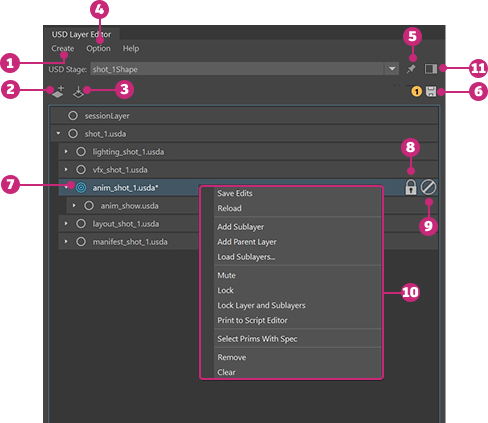
| # | Option | Description |
|---|---|---|
| 1 | Create a stage | Select from this menu to create a new USD stage or create a stage from an existing USD file. |
| 2 | Add a new layer | Click  to add a new anonymous layer next to the selected layer. If no layer is selected, the new layer will be added as the topmost sublayer under the root layer. to add a new anonymous layer next to the selected layer. If no layer is selected, the new layer will be added as the topmost sublayer under the root layer. |
| 3 | Load an existing layer | Click  to load an existing layer as a sublayer to the selected layer or the root layer if no layer is selected. to load an existing layer as a sublayer to the selected layer or the root layer if no layer is selected. |
| 4 | Options menu | Select Options > Auto-Hide Session Layer to automatically hide the session layer. |
| 5 | Pin a stage | Click  to pin a stage. When pinned, the stage selection in the USD Layer Editor will be maintained regardless of the selection made in the Outliner. When unpinned, the stage selection in the USD Layer Editor will automatically update to reflect the stage or prim currently selected in the Outliner. Tip: Setting a pin will trigger a scene save. Also, your pin state and selected stage will be remembered between Maya sessions. to pin a stage. When pinned, the stage selection in the USD Layer Editor will be maintained regardless of the selection made in the Outliner. When unpinned, the stage selection in the USD Layer Editor will automatically update to reflect the stage or prim currently selected in the Outliner. Tip: Setting a pin will trigger a scene save. Also, your pin state and selected stage will be remembered between Maya sessions. |
| 6 | Save a stage | Click  to save a stage and bulk save any unsaved edits on your stage. The number of unsaved edits is displayed beside the save stage icon. to save a stage and bulk save any unsaved edits on your stage. The number of unsaved edits is displayed beside the save stage icon. |
| 7 | Set target layer | Hover next to a layer name and click the grey target icon  when it appears. Once a layer is set as the target layer, the highlighted target icon when it appears. Once a layer is set as the target layer, the highlighted target icon  appears next to the layer name. Once a layer is set as the target layer, any scene editing operations are made on this layer. appears next to the layer name. Once a layer is set as the target layer, any scene editing operations are made on this layer. |
| 8 | Lock a Layer | Click  to lock a layer. When a layer is locked, you cannot target or add sublayers to it. If a locked layer has sublayers, they cannot have new parent layers added to them. to lock a layer. When a layer is locked, you cannot target or add sublayers to it. If a locked layer has sublayers, they cannot have new parent layers added to them. |
| 9 | Mute a Layer | Click  to mute a layer. When a layer is muted, it is ignored by the stage and the contents of the muted layer disappear in the Viewport and Outliner. Muted layers do not participate in value resolution or composition. Muting can be used if a particular layer is affecting performance or having an undesirable effect on the scene. to mute a layer. When a layer is muted, it is ignored by the stage and the contents of the muted layer disappear in the Viewport and Outliner. Muted layers do not participate in value resolution or composition. Muting can be used if a particular layer is affecting performance or having an undesirable effect on the scene. |
| 10 | Context menu | Access the context menu by right-clicking a layer. |
| 11 | Layer Data Window | Click to display the contents of the currently selected layer in detail. |
Read-only layers or layers with metadata SetPermissiontoEdit=False will have limited capabilites from the full set of options in the Layer Editor. See read-only layers in the USD Layer Editor context menu to learn more.
Merging Sublayers
The Merge with Sublayers command lets you flatten a layer's sublayer hierarchy by merging the contents of child sublayers into their parent layer. This simplifies your layer stack by consolidating opinions from multiple sublayers into a single layer, reducing complexity when managing USD scenes and assets.
How It Works
When you merge a layer with its sublayers, all USD opinions (attribute values, overrides, relationships, etc.) held in the child sublayers are composed and written into the parent layer. The child sublayers are then removed from the layer stack. The merge respects the standard USD composition strength ordering — stronger opinions take precedence over weaker ones.
Using Merge with Sublayers
- Open the USD Layer Editor
- Right-click a layer that has one or more sublayers.
- Select "Merge with Sublayers" from the context menu
The child sublayer contents are merged into the selected parent layer, and the child sublayers are removed.
Bulk Merge
You can select multiple sibling layers in the Layer Editor. If at least one of the selected layers has child sublayers, the Merge with Sublayers option appears in the context menu. The merge operation is performed on each selected layer stack individually.
Opinions
Layers contain opinions about the prims in the scene. Creating a value for an attribute, metadata or relationship also creates an opinion for the object on the layer. The strengths of the layers in a layer stack determines which opinion is expressed in the scene. One object may be affected by multiple opinions on different layers. In USD, LIVRPS strength ordering provides a framework for the ordering of opinions. For example, if the asset department creates a green teacup. At a later date, the lighting department decides to make the teacup white by adding an opinion on the lighting layer. According to LIVRPS rules, the strongest opinion wins. With the local layer in the layer stack being the strongest, the teacup is rendered white. For more information on LIVRPS strength ordering, visit LIVRPS strength ordering
As a form of best practice, avoid performing edits (either via Manipulators, the Attribute Editor or the Outliner) to weaker layers in your layer stack. Edits performed to weaker layers will be blocked as the USD framework is based on top level layers having stonger opinions that override those of weaker layers in the stack.
Edit Forwarding
Python API
MayaUSD now exposes a Python API for the Edit Forwarding system via the AdskUsdEditForward module. Edit Forwarding allows you to define rules that automatically redirect USD edits to a designated target layer, giving you finer control over where opinions land in your layer stack.
The API enables the following capabilities:
- Configure rules: Programmatically create and manage forwarding rules that control which edits get redirected and where they go.
- Preview forwarding: Inspect how edits would be routed before committing, so you can verify your rules behave as expected.
- Trigger forwarding: Initiate the forwarding process on demand from scripts or tools.
Getting started
To get started with the API, type the following into a Python tab of the Script Editor:
import AdskUsdEditForward as EF
help(EF)
This gives you full access to the Edit Forwarding API from within Maya's Python environment, enabling integration into custom pipelines, automated workflows, and studio tooling.
Edit Forwarding Preview
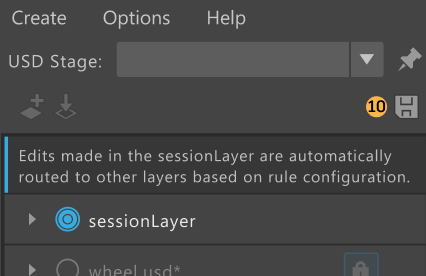
If there are Edit Forwarding rules on a stage a banner will appear in the Layer Editor telling you edits made in the Session Layer are automatically forwarded based on the rule configuration.
Printing operations to the Script Editor
Edit Forwarding operation messages can be printed to the Script Editor via the Echo Edit Forwarding in Script Editor menu under the Options menu of the Layer Editor.
Related Concepts: If you're new to USD, you can get familar with USD terminology from Pixar's USD documentation. Some specific terms of relevance are: layer, layer stack, root layer stack, session layer, stage, composition, composition arcs, LIVRPS strength ordering, opinions, and references.