Component Creator
The Component Creator allows you to create a USD asset from Maya scene objects or USD prims. The resulting USD hierarchy is structured according to a customizable JSON template, making it ideal for standardizing your structure between assets.
Component Creator Options
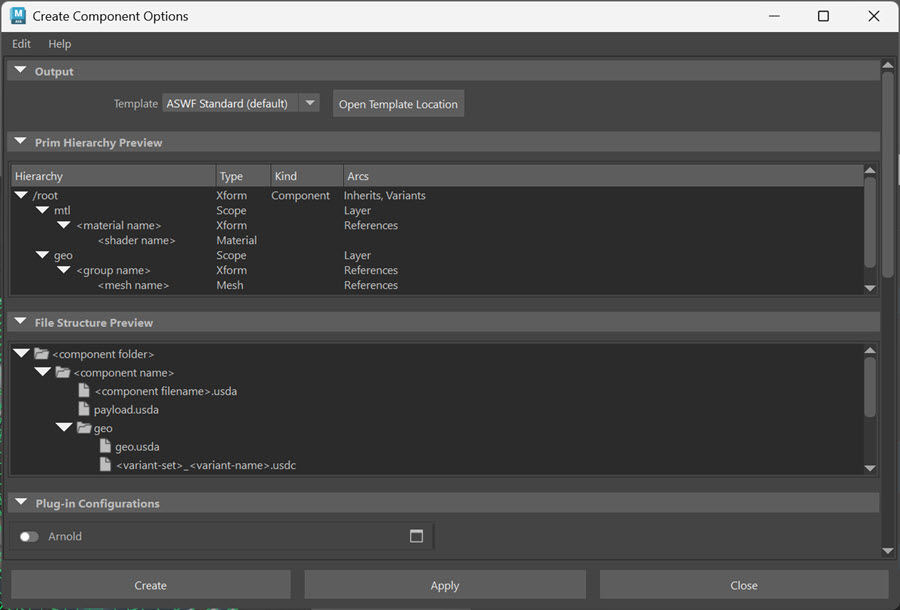
To understand how your components will be structured, or to set a custom template file, open the Component Creator options dialog by clicking the options box at the Create Component menu.
Output
Template Specifies the JSON template used to structure the resulting USD asset (ASWF standard by default). You can click Open Template Location to quickly navigate to the template file's location on disk.
ASWF standard example:
    "at_origin": false,
    "center_component": false,
    "class_prefix_path": "",
    "component_prim_path_pattern": "/root",
    "file_extension": "usda",
    "filename_pattern": "{component_folder}/{component_name}/{component_filename}.{file_extension}",
    "flatten_source": false,
    "materials_scope_name": "mtl",
    "meshes_scope_name": "geo",
    "options_description": "ASWF Standard options for the component creator.\nIt represents the component structure that we want to\npromote as the correct way to encapsulate a component.",
    "options_name": "ASWF Standard (default)",
    "payload_filename_pattern": "{component_folder}/{component_name}/{scope_name}/{variant_selections}.usdc",
    "scope_layer_filename_pattern": "{component_folder}/{component_name}/{scope_name}/{scope_name}.{file_extension}",
    "sub_layers_in_payload": true,
    "sub_layers_payload_filename_pattern": "{component_folder}/{component_name}/payload.{file_extension}",
    "variant_name_pattern": "{object_name}",
    "variant_numbered_pattern": "variant_<n>",
    "variant_set_name_pattern": "{object_name}",
"variant_set_numbered_pattern": "variant_set_<n>"| Option | Type | Description |
|---|---|---|
| options_name | Text | Name of the options template |
| options_description | Text | Description of each option used in the Component Creator. |
| flatten_source | Boolean | Control if the source USD file is to be flattened into a single layer. Default: false |
| file_extension | Text | The USD file extension to use: 'usd', 'usda', or 'usdc'. Default: usda |
| center_component | Boolean | Optionally center the component bounding-box at the origin. Default: false |
| at_origin | Boolean | Optionally clears the transforms of root transformable prims. Default: false |
| class_prefix_path | Sdf.Path | The path prefix to be used to generate the class names of the components. |
| sub_layers_in_payload | Boolean | Control if sub-layers are put in a payload or directly in the root layer. Would put the same sub-layers in multiple places. Default: true |
| meshes_scope_name | Text | Name of the mesh scope. Default: "geo" |
| materials_scope_name | Text | Name of the material scope. Default: "mtl" |
| component_prim_path_pattern | Text | The component path pattern to be used to generate the component path. |
| filename_pattern | Text | The filename pattern used to generate the file name of the component. |
| sub_layers_payload_filename_pattern | Text | The filename pattern used to generate the sub-layers payload. |
| scope_layer_filename_pattern | Text | The filename pattern used to generate the filename of the scope sub-layers. |
| payload_filename_pattern | Text | The filename pattern used to generate the filename of the payloads. |
| variant_set_name_pattern | Text | The name pattern used to generate variant-set names. |
| variant_set_numbered_pattern | Text | The name pattern used to generate numbered variant-set names. |
| variant_name_pattern | Text | The name pattern used to generate variant names. |
| variant_numbered_pattern | Text | The name pattern used to generate numbered variant names. |
Prim Hierarchy Preview
Displays a generalized version of the prim hierarchy according to the template.
File Structure Preview
Displays a generalized version of the USD file structure on disk according to the template.
For more information on the remaining options, see USD Export Options
For a more complete, in-depth description of templates, see the section below More on Component Creator Templates.
Creating Components
Once you have your template set, components can be created with or without variants through menus accessed by right-clicking objects and prims in the Outliner or the Viewport. The method will depend on what kind of data your are starting with:
For Maya objects, select an object in the Outliner or Viewport and choose USD > Create Component. Selecting more than one object will also allow you to create a Component with Variants by choosing USD > Create Component with Variants.
For USD prims, select a prim in the Outliner and choose Create Component, or select two or more prims and choose Create Component with Variants.
More on Component Creator Templates
Overview
The Component Creator output is controlled by options contained in a template file. The file is in JSON format, containing the value for each option.
For Maya, the templates are found in the maya/USDTemplates folder in your "Documents" personal folder. The default template file is generated there the first time the component creator is loaded in Maya.
Template Options
Template options are grouped into four categories:
- Template description
- Input modifications
- File naming
- USD data structure
Template Description
The following options describe the template itself
| Option | Format | Description |
|---|---|---|
| options_description | text | Description of the template |
| options_name | text | Name of the template (must match filename) |
Input Modifications
These options modify the input USD data.
| Option | Format | Description |
|---|---|---|
| at_origin | bool | Clears transforms of root prims |
| center_component | bool | Centers bounding box at origin |
| flatten_source | bool | Flattens composition arcs (payloads, references, etc.) |
flatten_source Notes The flatten_source option needs more explanation; The component creator always reads the composed opinions of the input file. Internally, it always reduces the local layers in the hierarchy of the input file to a single layer, even when the option is off. The difference is that when the option is turned on, it will also flatten all composition arcs, like payloads, references, inherits, etc. One main consequence of turning the flatten_source option on or off is the handling of payloads and references.
If off, external payloads are kept as payloads, while the local layer stack and opinions are collapsed. One possible consequence is when the local layer stack has variants, but the variant selection affects the contents of the payload; In this case, the local variant selection will be gone in the component, but the variants in the external payloads will still have variant-structured data. When the component loads the payloads, since it does not have the variant selection of the original USD, the payload will use the default selection, which might surprise the user.
If on, the payloads and references will be flattened at the same time as the local layer stack of the input USD. This means that the current variant selection of the input will be used all the way down into the payloads. Thus, the component data will correctly and fully represent the variant that was selected in the input USD. This avoids the surprising effects of the off mode, but the contents of the external payloads are now inside the component and are no longer external payloads.
File Naming
These options control the generation of the filenames of the output component.
| Option | Format | Description |
|---|---|---|
| file_extension | text | usd / usda / usdc |
| filename_pattern | text | Root layer filename |
| payload_filename_pattern | text | Payload filename |
| scope_layer_filename_pattern | text | Scope layer filename |
| sub_layers_payload_filename_pattern | text | Sub-layer payload filename |
These filename patterns can contain special tokens that get replaced with values derived from the particular component being generated. These tokens are special names contained within curly brackets. For example: {component_name}.
Here is the list of tokens that can be used for filenames:
|Token|Documentation|
|-----|-------------|
|{component_name}|The name of the component|
|{component_folder}|The folder containing the component, which itself is a folder|
|{component_filename}|The base filename of the root layer of the component|
|{file_extension}|The file extension used for USD files as per the file_extension option|
|{scope_name}|The name of the scope, for the scope filenames|
|{variant_set_name}|The names of all variant sets|
|{variant_name}|The names of all variants selected in the variant sets|
|{variant_selections}|The variant sets and their selected variants, in pairs|
|{object_name}|The name of the selected object from which the component is generated|
USD Data Structure
These options control the structure of the output USD data.
| Option | Format | Description |
|---|---|---|
| class_prefix_path | SdfPath | Prefix for class names |
| component_prim_path_pattern | text | Root component path |
| materials_scope_name | text | Materials scope (e.g., mtl) |
| meshes_scope_name | text | Mesh scope (e.g., geo) |
| sub_layers_in_payload | bool | Put sublayers in payload |
| variant_name_pattern | text | Variant naming |
| variant_numbered_pattern | text | Numbered variant naming |
| variant_set_name_pattern | text | Variant set naming |
| variant_set_numbered_pattern | text | Numbered variant set |
The variant set and variant name pattern use the same tokens as the filename patterns described in the previous section. In addition, there is one extra token that can be used for numbered pattern:
The variant name and variant set patterns are used when there is only a single selected input object used to generate the component. If there are no selected objects or if there are more than one object, then the numbered patterns are used instead.
FAQ
What is the overall USD component file structure? The created component follows the ASWF recommendations about how to structure the data into multiple USD files for clarity and flexibility. Here is the file structure created by the default template, based on the previously described tokens:
component_folder/
  component_name/
    RootLayer.usda
    payload.usda
    geo/
      geo.usda
      variant.usdc
    mtl/
      mtl.usda
      variant.usdc
For example, let’s suppose the tokens values are as follows: |Token|Value| |-----|-----| |{component_name}|NewComponent| |{component_folder}|C:/Data| |{component_filename}|RootLayer| |{file_extension}|usda| |{scope_name}|geo and mtl| |{variant_selections}|variant_set_1 and variant_1| |{object_name}|Building|
Then the file structure would be:
C:/Data
  NewComponent
    RootLayer.usda
    payload.usda
    geo
      geo.usda
      variant_set_1_variant_1.usdc
    mtl
      mtl.usda
      variant_set_1_variant_1.usdc
Why have geo, mtl and bindings sub-layers?
There are multiple reasons to have geo, mtl and bindings sub-layers instead of having the data directly in the root layer of the component.
The first is that it allows a production pipeline to lock these layers when an artist does not have access to, and should not be modifying this data. For example, by locking the material bindings layer, the artist cannot change what materials are assigned to meshes. Similarly, locking the meshes layer, the artist cannot modify the geometry.
The second is that it allows turning off these elements rapidly by muting these layers. For example, muting the material bindings layer removes all materials from all meshes.
Third, it makes the root layer lighter. Currently we have three sub-layers, but we may have other ones in the future. For example, we could add similar sub-layers for lights, special effects, etc. If all that data was in the root layer, it would become very large.