You can create triangular and quadrilateral areas filled with a color. When creating filled areas, set the FILLMODE system variable to off to improve performance and back on once the fills have been created.
When you create a quadrilateral solid-filled area, the sequence of the third and fourth points determines its shape. Compare the following illustrations:
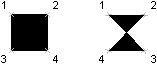
The first two points define one edge of the polygon. The third point is defined diagonally opposite from the second. If the fourth point is set equal to the third point, then a filled triangle is created.
Create a solid-filled object
The following example creates a quadrilateral solid (bow-tie) in Model space using the coordinates (0, 0, 0), (5, 0, 0), (5, 8, 0), and (0, 8, 0). It also creates a quadrilateral solid in a rectangular shape using the coordinates (10, 0, 0), (15, 0, 0), (10, 8, 0), and (15, 8, 0).
C# Example
using Autodesk.AutoCAD.Runtime;
using Autodesk.AutoCAD.ApplicationServices;
using Autodesk.AutoCAD.DatabaseServices;
using Autodesk.AutoCAD.Geometry;

[CommandMethod("Add2DSolid")]
public static void Add2DSolid()
{
    // Get the current document and database
    Document acDoc = Application.DocumentManager.MdiActiveDocument;
    Database acCurDb = acDoc.Database;

    // Start a transaction
    using (Transaction acTrans = acCurDb.TransactionManager.StartTransaction())
    {
        // Open the Block table for read
        BlockTable acBlkTbl;
        acBlkTbl = acTrans.GetObject(acCurDb.BlockTableId,
                                     OpenMode.ForRead) as BlockTable;

        // Open the Block table record Model space for write
        BlockTableRecord acBlkTblRec;
        acBlkTblRec = acTrans.GetObject(acBlkTbl[BlockTableRecord.ModelSpace],
                                        OpenMode.ForWrite) as BlockTableRecord;

        // Create a quadrilateral (bow-tie) solid in Model space
        using (Solid ac2DSolidBow = new Solid(new Point3d(0, 0, 0),
                                              new Point3d(5, 0, 0),
                                              new Point3d(5, 8, 0),
                                              new Point3d(0, 8, 0)))
        {
            // Add the new object to the block table record and the transaction
            acBlkTblRec.AppendEntity(ac2DSolidBow);
            acTrans.AddNewlyCreatedDBObject(ac2DSolidBow, true);
        }

        // Create a quadrilateral (square) solid in Model space
        using (Solid ac2DSolidSqr = new Solid(new Point3d(10, 0, 0),
                                              new Point3d(15, 0, 0),
                                              new Point3d(10, 8, 0),
                                              new Point3d(15, 8, 0)))
        {
            // Add the new object to the block table record and the transaction
            acBlkTblRec.AppendEntity(ac2DSolidSqr);
            acTrans.AddNewlyCreatedDBObject(ac2DSolidSqr, true);
        }

        // Save the new object to the database
        acTrans.Commit();
    }
}