You scale an object by specifying a base point and scale factor based on the current drawing units. You can scale all drawing objects, as well as attribute reference objects.
To scale an object, use the Scaling function of a transformation matrix. This function requires a numeric value for the scale factor of the object and a Point3d object for the base point of the scaling operation. The Scaling function scales the object equally in the X, Y, and Z directions. The dimensions of the object are multiplied by the scale factor. A scale factor greater than 1 enlarges the object. A scale factor between 0 and 1 reduces the object.
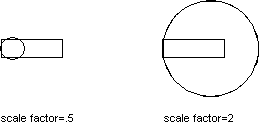
Scale a polyline
This example creates a closed lightweight polyline and then scales the polyline by 0.5 from the base point (4,4.25,0).
C# Example
using Autodesk.AutoCAD.Runtime;
using Autodesk.AutoCAD.ApplicationServices;
using Autodesk.AutoCAD.DatabaseServices;
using Autodesk.AutoCAD.Geometry;

[CommandMethod("ScaleObject")]
public static void ScaleObject()
{
    // Get the current document and database
    Document acDoc = Application.DocumentManager.MdiActiveDocument;
    Database acCurDb = acDoc.Database;

    // Start a transaction
    using (Transaction acTrans = acCurDb.TransactionManager.StartTransaction())
    {
        // Open the Block table for read
        BlockTable acBlkTbl;
        acBlkTbl = acTrans.GetObject(acCurDb.BlockTableId,
                                     OpenMode.ForRead) as BlockTable;

        // Open the Block table record Model space for write
        BlockTableRecord acBlkTblRec;
        acBlkTblRec = acTrans.GetObject(acBlkTbl[BlockTableRecord.ModelSpace],
                                        OpenMode.ForWrite) as BlockTableRecord;

        // Create a lightweight polyline
        using (Polyline acPoly = new Polyline())
        {
            acPoly.AddVertexAt(0, new Point2d(1, 2), 0, 0, 0);
            acPoly.AddVertexAt(1, new Point2d(1, 3), 0, 0, 0);
            acPoly.AddVertexAt(2, new Point2d(2, 3), 0, 0, 0);
            acPoly.AddVertexAt(3, new Point2d(3, 3), 0, 0, 0);
            acPoly.AddVertexAt(4, new Point2d(4, 4), 0, 0, 0);
            acPoly.AddVertexAt(5, new Point2d(4, 2), 0, 0, 0);

            // Close the polyline
            acPoly.Closed = true;

            // Reduce the object by a factor of 0.5
            // using a base point of (4,4.25,0)
            acPoly.TransformBy(Matrix3d.Scaling(0.5, new Point3d(4, 4.25, 0)));

            // Add the new object to the block table record and the transaction
            acBlkTblRec.AppendEntity(acPoly);
            acTrans.AddNewlyCreatedDBObject(acPoly, true);
        }

        // Save the new objects to the database
        acTrans.Commit();
    }
}