Once you have created a solid, you can create more complex shapes by combining or subtracting solids. You can join solids, subtract solids from each other, or find the common volume (overlapping portion) of solids. Use the BooleanOperation method to perform these combinations. The CheckInterference method allows you to determine if two solids overlap.
Solids are further modified by obtaining the 2D cross section of a solid or slicing a solid into two pieces. Use the GetSection method to find cross sections of solids, and the Slice method for slicing a solid into two pieces.
Find the interference between two solids
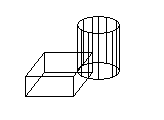
This example creates a box and cylinder. It then finds the interference between the two solids and creates a new solid from that interference. For ease of viewing, the box is colored white, the cylinder is colored cyan, and the interference solid is colored red.
C# Example
using Autodesk.AutoCAD.Runtime;
using Autodesk.AutoCAD.ApplicationServices;
using Autodesk.AutoCAD.DatabaseServices;
using Autodesk.AutoCAD.Geometry;

[CommandMethod("FindInterferenceBetweenSolids")]
public static void FindInterferenceBetweenSolids()
{
    // Get the current document and database, and start a transaction
    Document acDoc = Application.DocumentManager.MdiActiveDocument;
    Database acCurDb = acDoc.Database;

    using (Transaction acTrans = acCurDb.TransactionManager.StartTransaction())
    {
        // Open the Block table record for read
        BlockTable acBlkTbl;
        acBlkTbl = acTrans.GetObject(acCurDb.BlockTableId,
                                     OpenMode.ForRead) as BlockTable;

        // Open the Block table record Model space for write
        BlockTableRecord acBlkTblRec;
        acBlkTblRec = acTrans.GetObject(acBlkTbl[BlockTableRecord.ModelSpace],
                                        OpenMode.ForWrite) as BlockTableRecord;

        // Create a 3D solid box
        using (Solid3d acSol3DBox = new Solid3d())
        {
            acSol3DBox.CreateBox(5, 7, 10);
            acSol3DBox.ColorIndex = 7;

            // Position the center of the 3D solid at (5,5,0)
            acSol3DBox.TransformBy(Matrix3d.Displacement(new Point3d(5, 5, 0) -
                                                         Point3d.Origin));

            // Add the new object to the block table record and the transaction
            acBlkTblRec.AppendEntity(acSol3DBox);
            acTrans.AddNewlyCreatedDBObject(acSol3DBox, true);

            // Create a 3D solid cylinder
            // 3D solids are created at (0,0,0) so there is no need to move it
            using (Solid3d acSol3DCyl = new Solid3d())
            {
                acSol3DCyl.CreateFrustum(20, 5, 5, 5);
                acSol3DCyl.ColorIndex = 4;

                // Add the new object to the block table record and the transaction
                acBlkTblRec.AppendEntity(acSol3DCyl);
                acTrans.AddNewlyCreatedDBObject(acSol3DCyl, true);

                // Create a 3D solid from the interference of the box and cylinder
                Solid3d acSol3DCopy = acSol3DCyl.Clone() as Solid3d;

                // Check to see if the 3D solids overlap
                if (acSol3DCopy.CheckInterference(acSol3DBox) == true)
                {
                    acSol3DCopy.BooleanOperation(BooleanOperationType.BoolIntersect,
                                                 acSol3DBox.Clone() as Solid3d);

                    acSol3DCopy.ColorIndex = 1;
                }

                // Add the new object to the block table record and the transaction
                acBlkTblRec.AppendEntity(acSol3DCopy);
                acTrans.AddNewlyCreatedDBObject(acSol3DCopy, true);
            }
        }

        // Save the new objects to the database
        acTrans.Commit();
    }
}
Slice a solid into two solids
This example creates a box in model space. It then slices the box based on a plane defined by three points. The slice is returned as a 3DSolid.
C# Example
using Autodesk.AutoCAD.Runtime;
using Autodesk.AutoCAD.ApplicationServices;
using Autodesk.AutoCAD.DatabaseServices;
using Autodesk.AutoCAD.Geometry;

[CommandMethod("SliceABox")]
public static void SliceABox()
{
    // Get the current document and database, and start a transaction
    Document acDoc = Application.DocumentManager.MdiActiveDocument;
    Database acCurDb = acDoc.Database;

    using (Transaction acTrans = acCurDb.TransactionManager.StartTransaction())
    {
        // Open the Block table record for read
        BlockTable acBlkTbl;
        acBlkTbl = acTrans.GetObject(acCurDb.BlockTableId,
                                     OpenMode.ForRead) as BlockTable;

        // Open the Block table record Model space for write
        BlockTableRecord acBlkTblRec;
        acBlkTblRec = acTrans.GetObject(acBlkTbl[BlockTableRecord.ModelSpace],
                                        OpenMode.ForWrite) as BlockTableRecord;

        // Create a 3D solid box
        using (Solid3d acSol3D = new Solid3d())
        {
            acSol3D.CreateBox(5, 7, 10);
            acSol3D.ColorIndex = 7;

            // Position the center of the 3D solid at (5,5,0)
            acSol3D.TransformBy(Matrix3d.Displacement(new Point3d(5, 5, 0) -
                                                      Point3d.Origin));

            // Add the new object to the block table record and the transaction
            acBlkTblRec.AppendEntity(acSol3D);
            acTrans.AddNewlyCreatedDBObject(acSol3D, true);

            // Define the mirror plane
            Plane acPlane = new Plane(new Point3d(1.5, 7.5, 0),
                                      new Point3d(1.5, 7.5, 10),
                                      new Point3d(8.5, 2.5, 10));

            Solid3d acSol3DSlice = acSol3D.Slice(acPlane, true);
            acSol3DSlice.ColorIndex = 1;

            // Add the new object to the block table record and the transaction
            acBlkTblRec.AppendEntity(acSol3DSlice);
            acTrans.AddNewlyCreatedDBObject(acSol3DSlice, true);
        }

        // Save the new objects to the database
        acTrans.Commit();
    }
}