You can move all drawing objects and attribute reference objects along a specified vector.
To move an object, use the Displacement function of a transformation matrix. This function requires a Vector3d object as input. If you do not know the vector that you need, you can create a Point3d object and then use the GetVectorTo method to return the vector between two points. The displacement vector indicates how far the given object is to be moved and in what direction.
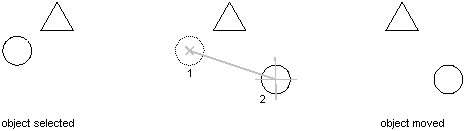
Move a circle along a vector
This example creates a circle and then moves that circle two units along the X axis.
C# Example
using Autodesk.AutoCAD.Runtime;
using Autodesk.AutoCAD.ApplicationServices;
using Autodesk.AutoCAD.DatabaseServices;
using Autodesk.AutoCAD.Geometry;

[CommandMethod("MoveObject")]
public static void MoveObject()
{
    // Get the current document and database
    Document acDoc = Application.DocumentManager.MdiActiveDocument;
    Database acCurDb = acDoc.Database;

    // Start a transaction
    using (Transaction acTrans = acCurDb.TransactionManager.StartTransaction())
    {
        // Open the Block table for read
        BlockTable acBlkTbl;
        acBlkTbl = acTrans.GetObject(acCurDb.BlockTableId,
                                     OpenMode.ForRead) as BlockTable;

        // Open the Block table record Model space for write
        BlockTableRecord acBlkTblRec;
        acBlkTblRec = acTrans.GetObject(acBlkTbl[BlockTableRecord.ModelSpace],
                                        OpenMode.ForWrite) as BlockTableRecord;

        // Create a circle that is at 2,2 with a radius of 0.5
        using (Circle acCirc = new Circle())
        {
            acCirc.Center = new Point3d(2, 2, 0);
            acCirc.Radius = 0.5;

            // Create a matrix and move the circle using a vector from (0,0,0) to (2,0,0)
            Point3d acPt3d = new Point3d(0, 0, 0);
            Vector3d acVec3d = acPt3d.GetVectorTo(new Point3d(2, 0, 0));

            acCirc.TransformBy(Matrix3d.Displacement(acVec3d));

            // Add the new object to the block table record and the transaction
            acBlkTblRec.AppendEntity(acCirc);
            acTrans.AddNewlyCreatedDBObject(acCirc, true);
        }

        // Save the new objects to the database
        acTrans.Commit();
    }
}