Mirroring flips an object along an axis or mirror line. You can mirror all drawing objects.
To mirror an object, use the Mirroring function of a transformation matrix. This function requires a Point3d, Plane, or Line3d object to define the mirror line. Since mirroring is done with a transformation matrix, a new object is not created. If you want to maintain the original object, you will need to create a copy of the object first and then mirror it.

To manage the reflection properties of Text objects, use the MIRRTEXT system variable. The default setting of MIRRTEXT is On (1), which causes Text objects to be mirrored just as any other object. When MIRRTEXT is Off (0), text is not mirrored. Use the GetSystemVariable and SetSystemVariable methods to query and set the MIRRTEXT setting.
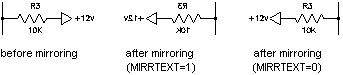
You can mirror a Viewport object in paper space, although doing so has no effect on its model space view or on model space objects.
Mirror a polyline about an axis
This example creates a lightweight polyline and mirrors that polyline about an axis. The newly created polyline is colored blue.
C# Example
using Autodesk.AutoCAD.Runtime;
using Autodesk.AutoCAD.ApplicationServices;
using Autodesk.AutoCAD.DatabaseServices;
using Autodesk.AutoCAD.Geometry;

[CommandMethod("MirrorObject")]
public static void MirrorObject()
{
    // Get the current document and database
    Document acDoc = Application.DocumentManager.MdiActiveDocument;
    Database acCurDb = acDoc.Database;

    // Start a transaction
    using (Transaction acTrans = acCurDb.TransactionManager.StartTransaction())
    {
        // Open the Block table for read
        BlockTable acBlkTbl;
        acBlkTbl = acTrans.GetObject(acCurDb.BlockTableId,
                                     OpenMode.ForRead) as BlockTable;

        // Open the Block table record Model space for write
        BlockTableRecord acBlkTblRec;
        acBlkTblRec = acTrans.GetObject(acBlkTbl[BlockTableRecord.ModelSpace],
                                        OpenMode.ForWrite) as BlockTableRecord;

        // Create a lightweight polyline
        using (Polyline acPoly = new Polyline())
        {
            acPoly.AddVertexAt(0, new Point2d(1, 1), 0, 0, 0);
            acPoly.AddVertexAt(1, new Point2d(1, 2), 0, 0, 0);
            acPoly.AddVertexAt(2, new Point2d(2, 2), 0, 0, 0);
            acPoly.AddVertexAt(3, new Point2d(3, 2), 0, 0, 0);
            acPoly.AddVertexAt(4, new Point2d(4, 4), 0, 0, 0);
            acPoly.AddVertexAt(5, new Point2d(4, 1), 0, 0, 0);

            // Create a bulge of -2 at vertex 1
            acPoly.SetBulgeAt(1, -2);

            // Close the polyline
            acPoly.Closed = true;

            // Add the new object to the block table record and the transaction
            acBlkTblRec.AppendEntity(acPoly);
            acTrans.AddNewlyCreatedDBObject(acPoly, true);

            // Create a copy of the original polyline
            Polyline acPolyMirCopy = acPoly.Clone() as Polyline;
            acPolyMirCopy.ColorIndex = 5;

            // Define the mirror line
            Point3d acPtFrom = new Point3d(0, 4.25, 0);
            Point3d acPtTo = new Point3d(4, 4.25, 0);
            Line3d acLine3d = new Line3d(acPtFrom, acPtTo);

            // Mirror the polyline across the X axis
            acPolyMirCopy.TransformBy(Matrix3d.Mirroring(acLine3d));

            // Add the new object to the block table record and the transaction
            acBlkTblRec.AppendEntity(acPolyMirCopy);
            acTrans.AddNewlyCreatedDBObject(acPolyMirCopy, true);
        }

        // Save the new objects to the database
        acTrans.Commit();
    }
}