You can rotate all drawing objects and attribute reference objects.
To rotate an object, use the Rotation function of a transformation matrix. This function requires a rotation angle represented in radians, an axis of rotation, and a base point. The axis of rotation must be expressed as a Vector3d object and the base point as a Point3d object. This angle determines how far an object rotates around the base point relative to its current location.
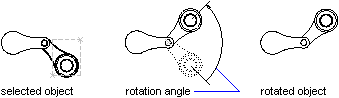
Rotate a polyline about a base point
This example creates a closed lightweight polyline, and then rotates the polyline 45 degrees about the base point (4, 4.25, 0).
C# Example
using Autodesk.AutoCAD.Runtime;
using Autodesk.AutoCAD.ApplicationServices;
using Autodesk.AutoCAD.DatabaseServices;
using Autodesk.AutoCAD.Geometry;

[CommandMethod("RotateObject")]
public static void RotateObject()
{
    // Get the current document and database
    Document acDoc = Application.DocumentManager.MdiActiveDocument;
    Database acCurDb = acDoc.Database;

    // Start a transaction
    using (Transaction acTrans = acCurDb.TransactionManager.StartTransaction())
    {
        // Open the Block table for read
        BlockTable acBlkTbl;
        acBlkTbl = acTrans.GetObject(acCurDb.BlockTableId,
                                     OpenMode.ForRead) as BlockTable;

        // Open the Block table record Model space for write
        BlockTableRecord acBlkTblRec;
        acBlkTblRec = acTrans.GetObject(acBlkTbl[BlockTableRecord.ModelSpace],
                                        OpenMode.ForWrite) as BlockTableRecord;

        // Create a lightweight polyline
        using (Polyline acPoly = new Polyline())
        {
            acPoly.AddVertexAt(0, new Point2d(1, 2), 0, 0, 0);
            acPoly.AddVertexAt(1, new Point2d(1, 3), 0, 0, 0);
            acPoly.AddVertexAt(2, new Point2d(2, 3), 0, 0, 0);
            acPoly.AddVertexAt(3, new Point2d(3, 3), 0, 0, 0);
            acPoly.AddVertexAt(4, new Point2d(4, 4), 0, 0, 0);
            acPoly.AddVertexAt(5, new Point2d(4, 2), 0, 0, 0);

            // Close the polyline
            acPoly.Closed = true;

            Matrix3d curUCSMatrix = acDoc.Editor.CurrentUserCoordinateSystem;
            CoordinateSystem3d curUCS = curUCSMatrix.CoordinateSystem3d;

            // Rotate the polyline 45 degrees, around the Z-axis of the current UCS
            // using a base point of (4,4.25,0)
            acPoly.TransformBy(Matrix3d.Rotation(0.7854,
                                                 curUCS.Zaxis,
                                                 new Point3d(4, 4.25, 0)));

            // Add the new object to the block table record and the transaction
            acBlkTblRec.AppendEntity(acPoly);
            acTrans.AddNewlyCreatedDBObject(acPoly, true);
        }

        // Save the new objects to the database
        acTrans.Commit();
    }
}