With the TransformBy method of an object and the Mirroring method of a Matrix, you can mirror objects along a specified mirroring plane specified by three points.
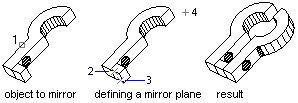
Mirror in 3D
This example creates a box in model space. It then mirrors the box about a plane and colors the mirrored box red.
C# Example
using Autodesk.AutoCAD.Runtime;
using Autodesk.AutoCAD.ApplicationServices;
using Autodesk.AutoCAD.DatabaseServices;
using Autodesk.AutoCAD.Geometry;

[CommandMethod("MirrorABox3D")]
public static void MirrorABox3D()
{
    // Get the current document and database, and start a transaction
    Document acDoc = Application.DocumentManager.MdiActiveDocument;
    Database acCurDb = acDoc.Database;

    using (Transaction acTrans = acCurDb.TransactionManager.StartTransaction())
    {
        // Open the Block table record for read
        BlockTable acBlkTbl;
        acBlkTbl = acTrans.GetObject(acCurDb.BlockTableId,
                                     OpenMode.ForRead) as BlockTable;

        // Open the Block table record Model space for write
        BlockTableRecord acBlkTblRec;
        acBlkTblRec = acTrans.GetObject(acBlkTbl[BlockTableRecord.ModelSpace],
                                        OpenMode.ForWrite) as BlockTableRecord;

        // Create a 3D solid box
        using (Solid3d acSol3D = new Solid3d())
        {
            acSol3D.CreateBox(5, 7, 10);

            // Position the center of the 3D solid at (5,5,0)
            acSol3D.TransformBy(Matrix3d.Displacement(new Point3d(5, 5, 0) -
                                                      Point3d.Origin));

            // Add the new object to the block table record and the transaction
            acBlkTblRec.AppendEntity(acSol3D);
            acTrans.AddNewlyCreatedDBObject(acSol3D, true);

            // Create a copy of the original 3D solid and change the color of the copy
            Solid3d acSol3DCopy = acSol3D.Clone() as Solid3d;
            acSol3DCopy.ColorIndex = 1;

            // Define the mirror plane
            Plane acPlane = new Plane(new Point3d(1.25, 0, 0),
                                      new Point3d(1.25, 2, 0),
                                      new Point3d(1.25, 2, 2));

            // Mirror the 3D solid across the plane
            acSol3DCopy.TransformBy(Matrix3d.Mirroring(acPlane));

            // Add the new object to the block table record and the transaction
            acBlkTblRec.AppendEntity(acSol3DCopy);
            acTrans.AddNewlyCreatedDBObject(acSol3DCopy, true);
        }

        // Save the new objects to the database
        acTrans.Commit();
    }
}