Surface Constraint
The Surface constraint restricts an object to the surface of another object. Its controls include U and V Position settings as well as an alignment option.
- Assign Controller (object Position track) > Surface
- Default menu: Animation menu > Position Controllers > Surface Constraint
- Alt menu: Animation menu > Constraints > Surface Constraint
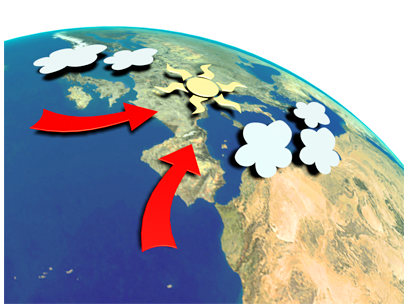
Surface constraints position the weather symbols on the globe.
The type of object that can be used as the surface object is limited to those whose surfaces can be represented parametrically. Use the Surface constraint with the following types of objects:
- Sphere
- Cone
- Cylinder
- Torus
- Quad Patch (single quad patch)
- Loft object
- NURBS object
The surface used is a "virtual" parametric surface, and not the actual mesh surface. Objects with a low number of segments might have a mesh surface quite different than the parametric surface.
The parametric surface ignores Slice and Hemisphere options. So if the object is sliced, for example, the controlled object will position itself as if the missing portion were still there.
Because the Surface constraint works only with parametric surfaces, if you apply a modifier that converts the object to a mesh, the constraint will no longer work. Thus it doesn’t support, say, a cylinder with a Bend modifier applied.
Procedures
Example: To animate a sphere over the surface of a cylinder:
In the Top viewport, create a cylinder and a sphere.
 Select the sphere, open the
  Motion panel, expand the Assign Controller rollout, and then expand the Transform heading in the list.
In the list window, click the Position item and then click
 (Assign Controller).
In the Assign Position Controller dialog list, click Surface and then click OK.
The Surface Controller Parameters rollout replaces the Key Info rollout.
Click Pick Surface, and then click the cylinder.
Turn on
 and
and  go to frame 0.
Use the V Position spinner to move the sphere to a starting position at the bottom of the cylinder, if necessary.
Drag the time slider to frame 100.
Use the V Position spinner to place the sphere at the top of the cylinder.
Set U Position to 300.
Turn off
 and
and  play the animation. The sphere moves over the surface of the cylinder in a helical path.
Interface
The Surface Constraint Parameters rollout is on the Motion panel.
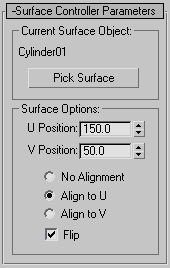
Current Surface Object group
This group provides a method for selecting and then displaying the selected surface object.
[object name]
Displays the name of the surface you picked.
Pick Surface
Click to pick an object, then in a viewport click the surface you want.
Surface Options group
This group provides controls for adjusting the position and orientation of the object along the surface.
U Position
Adjusts the position of the controlled object along the U coordinates of the surface object.
V Position
Adjusts the position of the controlled object along the V coordinates of the surface object.
- No Alignment When chosen, the controlled object is not reoriented, regardless of its position on the surface object.
- Align to U Aligns the local Z axis of the controlled object with the surface normal of the surface object, and the X axis with the U axis of the surface object.
- Align to V Aligns the local Z axis of the controlled object with the surface normal of the surface object, and the X axis is aligned with the V axis of the surface object.
Flip
Flips the alignment of the local Z axis of the controlled object. This checkbox is not available when No Alignment is chosen.