Waveform Controller
The Waveform controller is a float controller that provides regular, periodic waveforms. Created originally to control blinking lights, you can use it on any float value.
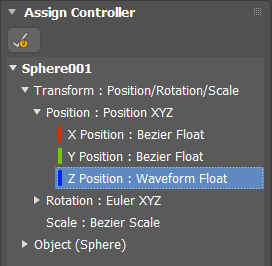
- Assign Controller > Waveform Float
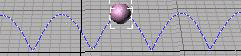
To view how the trajectory of an object is affected by the Waveform controller, turn on Motion panel > Trajectories.
Procedures
Example: To use the Waveform controller to animate the visibility of a sphere:
- Create a sphere.
- Open Track View and highlight the Sphere track.
- From the Edit menu choose Visibility Track > Add.
- Highlight the Visibility track, click Edit > Controller > Assign, and choose Waveform Float.
- Play the animation to see the effect.
To use the Waveform controller to animate the radius of a sphere:
- Create a sphere.
- Open Track View - Dope Sheet, and expand the Object (Sphere) track.
- Select the Radius track, click Controller > Assign, and choose Waveform Float from the Assign Controller dialog.
 Play the animation to see the effect.
Interface
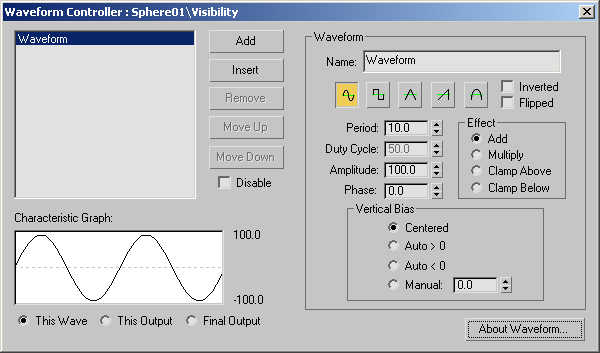
After assigning the Waveform controller, in Track View, right-click its track to display its properties in the Waveform Controller dialog.
[list of waveforms]
Displays waveforms in a list.
Add
Adds a new waveform to the end of the list. The default waveform is a sine wave with a period of 10 frames and with an amplitude of 100.
Insert
Inserts a new waveform before the selected waveform slot.
Remove
Deletes the selected waveform. This is not available when only one waveform remains.
Move Up and Move Down
Shifts the selected waveform up and down in the list, allowing the waveform order to be altered.
Disable
Disables the selected waveform.
Characteristic Graph
The Characteristic Graph shows one of three displays, controlled by the radio buttons below the display.
- This Wave Shows the current waveform only, independent of all other waveforms.
- This Output Shows the output of the current waveform, including all previous waveforms.
- Final Output Shows the output of all the waveforms in the list. You can also see the final output by turning on the Track View — Curve Editor display for the track which has the waveform controller assigned.
All displays show the output graph of the controller waveforms in a solid dark line, with the zero line drawn in a dotted gray line. Two numeric displays to the right show the high and low range of the waveform curve. The graph automatically scales vertically to fit the waveform output curve, and scales horizontally to two times the period of the longest-period waveform.
Waveform group
This group provides control parameters for the currently selected waveform.
Name
Contains the name of the waveform.
Waveform Icons
Specifies five waveform types: Sine, Square, Triangle, Sawtooth, and Half Sine.
Inverted
Flips the waveform vertically.
Flipped
Flips the waveform horizontally.
Period
Sets the number of frames to complete one waveform pattern. Spinner Value=float, 0.01 to 9,999,999
Duty Cycle
For square waves only, specifies the percentage of time the square wave is "on." Default=50, Spinner Value=float, 0 to 100
Amplitude
Sets the height of the wave. Spinner Value=float, 0 to 9,999,999
Phase
Sets the offset of the wave. Spinner Value=float, 0 to 1
Effect
Each waveform has an Effect parameter, which can be one of the following:
- Add Causes the current waveform's value to be added to the previous waveform's output. This is the default.
- Multiply Multiplies the previous waveform's output by this waveform's value.
- Clamp Above Limits the previous waveform's output to be above this waveform's value.
- Clamp Below Limits the previous waveform's output to be below this waveform's value.
Vertical Bias group
A waveform's output value can be altered by adjusting the Vertical Bias parameter. Spinner Value=float, –9,999,999 to 9,999,999
- Centered Centers the waveforms vertical bias about zero. For example, a 100 unit amplitude waveform would range from –100 to 100.
- Auto > 0 Shifts the waveform above the zero line.
- Auto < 0 Shifts the waveform below the zero line.
- Manual Lets you set the waveform manually by adjusting the spinner.