Block Parameters Dialog (Block Controller)
After clicking Add in the Driver Block Parameter dialog and selecting tracks in the Track View Pick dialog to create a Block, clicking OK in the Track View Pick dialog opens the Block Parameters dialog.
- Track View > Global Tracks > Block Control > Click and then right-click MasterBlock track. > Properties > Driver Block Parameters dialog > Add > Choose tracks in Track View Pick dialog > Click OK. > Block Parameters dialog
- Track View > Global Tracks > Block Control > Double-click MasterBlock track. > Properties > Driver Block Parameters dialog > Add > Choose tracks in Track View Pick dialog > Click OK. > Block Parameters dialog
Interface
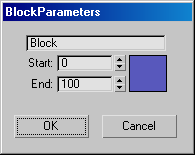
Name Field
Names the block.
Start, End
Set the range of the block in frames.
Color
Selects a color for the Block. Displays a color selection dialog.
OK
Saves the parameters and closes the dialog.
Cancel
Closes the dialog without saving the parameters.