Locks Rollout
The Locks rollout locks an object’s ability to transform along particular local axes.
- Make a selection. >
 Hierarchy panel > Link Info button > Locks rollout
Procedures
To lock all move transforms:
 Select an object.
In the Locks rollout, turn on Move group > X, Y, and Z.
Only rotate and scale transforms will work.
The object does not need to be part of a hierarchy.
Interface
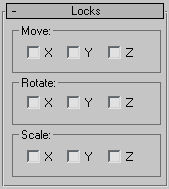
Move, Rotate, and Scale groups
X/Y/Z
Turn on any axis in the Move, Rotate, or Scale group box to lock that axis. For example, if Rotate > X and Y are turned on, you'll be able to rotate the object only around the Z axis. All locks are relative to an object's local coordinate system.