Mixer Rollout
On this rollout, you can load and save Motion Mixer (MIX) files. A saved MIX file can be loaded onto any biped in the scene, and motions in the mix will be automatically adapted to the biped's size.
- Select a biped. >
 Motion panel > Biped rollout >
  (Mixer Mode) > Mixer rollout
The Mixer rollout appears when Mixer Mode is turned on from the Biped rollout.
MIX Files
A MIX file contains data from the Motion Mixer, including information on trackgroups, tracks, clips, transitions and balance information. Compare with a mixdown, which contains the same data, but in a collapsed format; the data is no longer separated into tracks and clips.
Interface
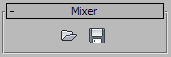
 Load File
Loads a Motion Mixer file ( .mix). These files include the following, which display in the Motion Mixer window when a MIX file is loaded:
- Trackgroups Groups of tracks for selected parts of the biped.
- Tracks Layer tracks and transition tracks where clips and transitions reside.
- Clips References to BIP animation files used in the mix.
- Transitions Connections between clips on transition tracks.
 Save File
Saves the currently selected biped's mix in the Motion Mixer to a MIX file.