Pick Nodes Dialog (Motion Mixer)
This dialog opens when you pick nodes for velocity blending or sub-blending. If you click the Select Velocity Nodes button, the list displays only the objects being mixed in the current transition track. If you click the Select Sub-blend Nodes button, the list displays only the objects being mixed in the current transition track, except those objects that are already velocity blends.
- Default menu: Graph Editors menu > Motion Mixer > Select a non-biped object clip transition. > Motion Mixer menu bar > Transitions > Edit > Mixer Transition Editor > Click the Select Velocity Nodes or Select Sub-blend Nodes button.
- Alt menu: Animation menu > Motion Editors > Motion Mixer > Select a non-biped object clip transition. > Motion Mixer dialog > Transitions > Edit > Mixer Transition Editor > Click the Select Velocity Nodes or Select Sub-blend Nodes button.
Interface
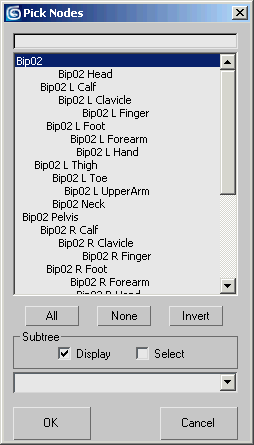
[search field]
To find an object in the list, enter the object's name and then press Enter.
[node list]
Lists all the available objects.
All
Selects all objects in the list.
None
Selects no objects in the list.
Invert
Inverts the current list selection.
Subtree group
Display
When on, the object hierarchy is shown by indenting. When off, all objects appear at the same level. Default=on.
Select
When on, selecting an object selects that object's children. When off, only one object at a time is selected. Default=off.
[named selection sets drop-down list]
This list shows the scene's named selection sets. Choosing a set from this list selects its members in the Node list.