Paste Controller
Paste Controller pastes the contents of the clipboard. You can use the Copy and Paste buttons to copy tracks, controllers, objects, and components.

- Track View > Controllers Toolbar > (Paste)
- Track View > Highlight a controller track in the Controller window. > Edit menu > Paste
- Keyboard >
Ctrl+V
Paste Controller is available only when the highlighted item in the Track View hierarchy window is of the same type as the data in the copy buffer. For example, if you’ve used Copy Controller to copy an Object component, you can paste the data only to an Object component.
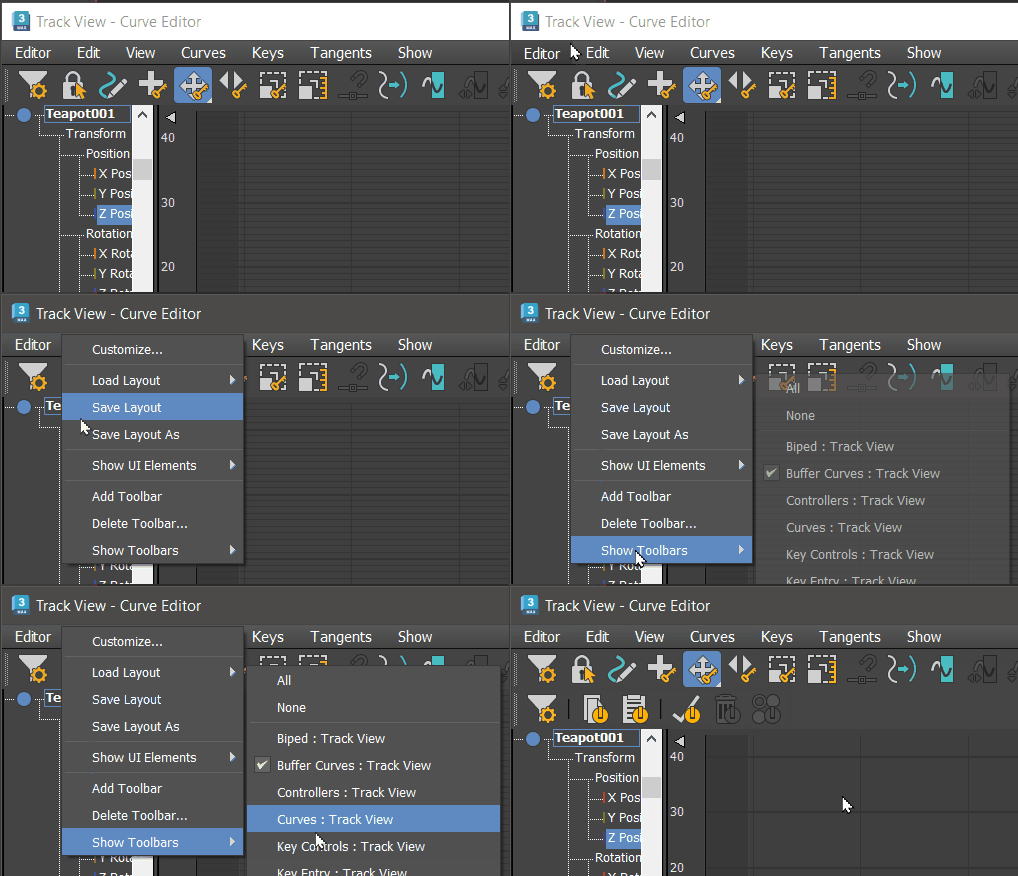
Procedures
See Copy Controller.
Interface
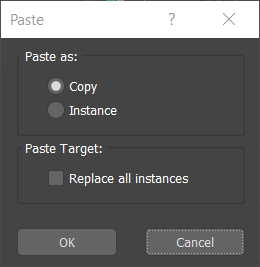
Paste Controller group
Pastes an item from the clipboard.
Copy/Instance
Determines whether the cloned item is a simple copy or an instance of the original.
Paste Target group
Replace All Instances
When you paste to any track that contains an instanced object, replaces all instances of the object with the object on the clipboard. If off, only the object in the selected track will be replaced. Any instanced objects will remain as they are. Default=off.