Time Toolbar
Controls on the Time toolbar let you select time ranges, remove time, scale it, insert it, or reverse its flow.
- Track View > Dope Sheet Introduction > Time toolbar
Interface
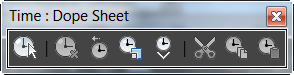
 Select Time
Lets you select a time range. Time selections include any keys that might be included within the time range. Use Insert Time, then Select Time to choose the time range. See Select Time.
 Delete Time
Removes selected time from the selected tracks. Cannot be applied globally to shorten the time segment. This removes keys but leaves “blank” frames behind. See Delete Time.
 Reverse Time
Reverses the keys on selected tracks within a selected time segment. See Reverse Time.
 Scale Time
Scales the keys within a selected time segment for selected tracks. See Scale Time
 Insert Time
Allows you to insert a range of frames as a time insertion. Existing keys slide out of the way to make room for inserted time. Once you have made a time selection with Insert Time, you can then use all the other time tools. See Insert Time.
 Cut Time
Deletes time selections from the selected tracks. See Cut Time.
 Copy Time
Duplicates the selected time selection so it will be available for pasting. See Copy Time.
 Paste Time
Adds cut or copied time selections into the selected tracks. See Paste Time.