Select And Manipulate
The Select And Manipulate tool lets you edit the parameters of certain objects, modifiers, and controllers by dragging "manipulators" in viewports.

- Main Toolbar > Select And Manipulate
Note: Unlike Select And Move and the other transforms, this button's state is non-exclusive. As long as Select mode or one of the transform modes is active, and Select And Manipulate is turned on, you can manipulate objects. However, you must turn off Select And Manipulate before you can select a manipulator helper.
You can add these custom manipulators to your scene:
These features have manipulators built in, which you can use to change parameters on these objects:
IK Solver Properties Rollout (HI Solver)
Primitives with a Radius parameter have a built-in manipulator for the radius.
Caddy Manipulators
When Select And Manipulate is active, the caddy appears in certain sub-object contexts for convenient access to settings. These include:
When Soft Selection is active, the caddy manipulator includes settings for Falloff, Pinch, and Bubble.
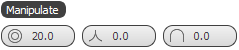


Tip: You can toggle the availability of any individual setting in the caddy manipulator with a checkbox setting that drops down from the respective ribbon control.