Creation Method Rollout
You can choose between a shape or a path for creating the loft object using the Creation Method rollout, as well as the type of action for the loft object.
- Select a path or shape. >
 Create panel >
  (Geometry) > Compound Objects > Object Type rollout > Loft > Creation Method rollout
 - Default menu: Select a path or shape. > Create menu > Compound > Loft > Creation Method rollout
- Alt menu: Select a path or shape. > Objects menu > Compound Objects > Loft > Creation Method rollout
Interface
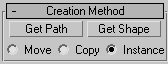
On the Creation Method rollout, you determine whether to use a shape or path for creating the loft object, and the type of action you want for the resulting loft object.
Note: 3ds Max builds the loft at the location of the first object you select: if you select a path and use Get Shape, it appears at the location of the path, and if you select a shape and use Get Path, it appears at the location of the shape.
Get Path
Assigns a path to the selected shape or changes the current assigned path.
Get Shape
Assigns a shape to the selected path or changes the current assigned shape.
Tip: Hold down
Ctrl while getting the shape to flip the direction of the shape's Z axis.Move/Copy/Instance
Lets you specify how the path or shape is transferred to the loft object. It can be moved, in which case no copy is left behind, or transferred as a copy or an instance.
Tip: Use the Instance option if you expect to edit or modify the path after the loft is created.