Defaults Panel
Use the Defaults panel tools for saving and loading brush settings.
- Ribbon > Freeform tab > Defaults panel
Interface
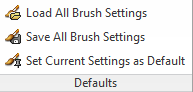
Load All Brush Settings
Opens a dialog for loading brush settings from an existing file.
Save All Brush Settings
Opens a dialog for storing brush settings in a file.
Set Current Settings as Default
Saves the active brush settings as defaults, so that they remain active thereafter. Confirm this action at the prompt.