About Heat Map Options
Use the Heat Map Solver window to access heat map solving options.
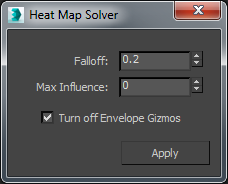
Falloff
Determines how smooth the bone blends. A value of 0 is the smoothest, while 1 is the most rigid.
Max Influence
The maximum number of bones that can influence a vertex. A value of 0 lets the solver decide how many bones to use.
Turn off Envelope Gizmos
When solving weights with Voxel or Heat Map, the weights are baked and the envelopes no longer have an effect on the skin weights. This option turns the display of the gizmos off.