Edit Point Modifier
The Edit Point modifier provides the same point-editing tools, rollouts, and parameters as the Editable Point object, but works non-destructively in the modifier stack. Use it to select, hide, and edit points and manage channels for your 3DGS or point data, without converting the object to an Editable Point.
For an example of how to use the Edit Point modifier in a workflow, see Edit individual trees in a point-instanced forest using the Point Flatten modifier.
 Modify panel > Make a selection > Modifier List > Object-Space Modifiers > Edit Point
- Default menu: Make a selection > Modifiers menu > Point Editing > Edit Point
Notes
- The Edit Point modifier works with any object that has points or vertices. If it's applied to a geometric object, the object is automatically converted to a Points object type, and its vertices are converted to points.
- Splat and point IDs have little or no coherence from frame to frame in an animated 3DGS sequence loaded from disk. Point sub-object edits made with the Edit Point modifier on one frame are not guaranteed to apply correctly to other frames. For more information, see Load a Gaussian Splat file from disk.
Interface
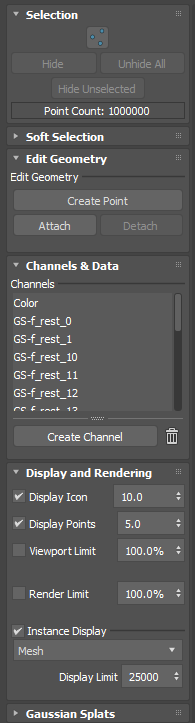
Selection rollout
Point icon: Click
 to enter point sub-object mode and select individual points.
Hide: Hides the selected point(s) from the viewport.
Note: This parameter hides the points. It does not delete them.Unhide All: Displays all hidden point(s) in the viewport.
Hide Unselected: When you make a point selection, all unselected points are hidden in the viewport.
Point Count: A running total of the points in the selection.
Soft Selection rollout
Lets you select points using the Soft Selection controls. For more information about the controls, see Soft Selection Rollout.
Edit Geometry rollout
Create Point: Adds points to the existing point data.
Attach: Enters Pick mode, letting you pick another object in the scene to bring its data in as points. If you attach geometry, its vertices are converted to points. If you attach another points object, its data is consumed as points. Pick mode stays active after each pick, so you can attach multiple objects before clicking Attach again to exit.
Detach: Creates a new point object from a selection of points. When you select points and click Detach, the Detach dialog opens so you can name the new points object and optionally detach as a clone.
For more information on the Attach and Detach parameters, see Edit 3DGS data and Create separate 3DGS objects using detach.
Channels & Data rollout
Channels List: Lists the available channels associated with the object's point data. Channels let you control a unique set of 3DGS data. When you click a channel in the list, parameters appear in the Data Editing section.
Create Channel: Creates a new channel for the selected object using the Create Channel window.
Data Editing: The Data Editing section displays parameters related to the selected channel. For example, selecting a Color channel provides parameters to select a color and use Select Similar. When one point is selected, clicking Select Similar selects similarly colored points, such as water or greenery. Increasing the percentage field expands the selection to include points with more dissimilar colors.
Similarly, selecting a Selection channel provides parameters to send a selection to a new Named Selection set or Channel.
Display and Rendering rollout
Display Icon: Toggles the visibility of the icon that represents the object in the viewport. Use the numeric field to set the size of the icon.
Display Points: Toggles the visibility of the points in the viewport. Use the numeric field to set the size of the points. If the points are very small, for example after importing 3DGS data, increasing their size can help you visualize the data, especially in less dense areas.
Viewport Limit: When on, limits the number of points displayed in the viewport to the percentage entered, and the number of points appears below the percentage value. The displayed points are chosen at random. By default, this option is off.
Tip: Lower the percentage to improve viewport performance with very dense data.Render Limit: When on, limits the number of points sent to the renderer to the percentage entered, and the number of points appears below the percentage value. The rendered points are chosen at random. By default, this option is off.
Note: Viewport Limit and Render Limit each have their own value, so you can choose to display fewer points in the viewport than what you render.Instance Display: Toggles the display of instanced geometry in the viewport.
Instance Display Type: Sets how instanced geometry displays: Bounding Box or Mesh.
Display Limit: Sets the maximum number of instances that display on the object. The instances that display are chosen at random, not the first instances in the object. For example, if Display Limit is set to 1000, a random selection of 1000 instances displays.
Gaussian Splats rollout
For more information, see the Gaussian Splats rollout in 3D Gaussian Splat (3DGS) in 3ds Max.