Lathe Modifier
Lathe creates a 3D object by rotating a shape or NURBS curve about an axis.
- Select a shape. >
 Modify panel > Modifier List > Lathe
 - Default menu: Select a shape. > Modifiers menu > Patch/Spline Editing > Lathe
- Alt menu: Select a shape. > Modifiers menu > Spline > Lathe
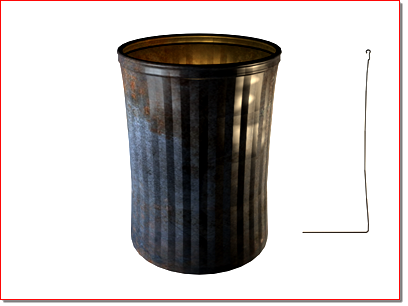
Object resulting from 360-degree lathe
Procedures
To use the Lathe modifier:
Interface
Modifier Stack
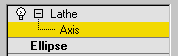
Axis
At this sub-object level, you can transform and animate the axis of revolution.
For more information on the stack display, see Modifier Stack.
Parameters rollout
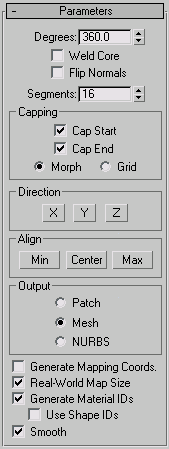
Degrees
Determines the number of degrees that the object is spun around the axis of revolution (0 to 360, default=360). You can set keyframes for Degrees to animate the circular growth of a lathed object. The Lathe axis auto-sizes itself to the height of the shape being lathed.
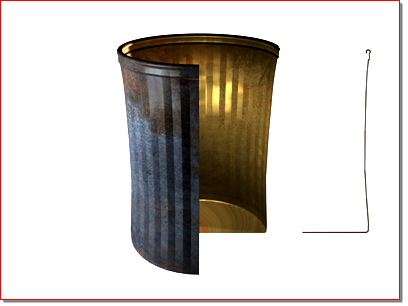
Object resulting from 270-degree lathe
Weld Core
Simplifies the mesh by welding together vertices that lie on the axis of revolution. Keep it turned off if you intend to create morph targets.
Flip Normals
Depending on the direction of the vertices on your shape, and the direction of rotation, the lathed object might be inside out. Toggle the Flip Normals checkbox to fix this.
Segments
Determines how many interpolated segments are created in the surface between the start and endpoint. This parameter is also animatable. Default=16
Capping group
Controls whether or not caps are created for the interior of the lathed object if Degrees is set to less than 360.
Cap Start
Caps the start of the lathed object with Degrees set to less than 360 and a closed shape.
Cap End
Caps the end of the lathed object with Degrees set to less than 360 and a closed shape.
- Morph Arranges cap faces in a predictable, repeatable pattern necessary for creating morph targets. Morph capping can generate long, thin faces that don't render or deform as well as grid capping. Use morph capping primarily if you are lathing multiple morph targets.
- Grid Arranges cap faces in a square grid trimmed at the shape boundaries. This method produces a surface of evenly sized faces that can easily be deformed by other modifiers.
Direction group
Sets up the direction of the axis of revolution, relative to the pivot point of the object.
X/Y/Z
Set the direction of the axis of revolution relative to the pivot point of the object.
Align group
Min/Center/Max
Align the axis of revolution to the minimum, center, or maximum extents of the shape.
Output group
- Patch Produces an object that you can collapse to a patch object (see Editing the Stack).
- Mesh Produces an object that you can collapse to a mesh object (see Editing the Stack).
- NURBS Produces an object that can be collapsed to a NURBS surface (see Editing the Stack).
Generate Mapping Coordinates
Applies mapping coordinates to the lathed object. When Degrees is less than 360, and Generate Mapping Coordinates is turned on, additional mapping coordinates are applied to the end caps, placing a 1 x 1 tile on each cap.
Real-World Map Size
Controls the scaling method used for texture mapped materials that are applied to the object. The scaling values are controlled by the Use Real-World Scale settings found in the applied material's Coordinates rollout. Default=on.
Generate Material IDs
Assigns different material IDs to the sides and the caps of the lathed object. Specifically, the sides receive ID 3, and the caps (when Degrees is less than 360 and the lathed shape is closed) receive IDs 1 and 2. Default=on.
Use Shape IDs Uses the material ID values assigned to segments in the spline you lathed, or curve sub-objects in the NURBS curve you lathed. Use Shape IDs is available only when Generate Material IDs is turned on.
Smooth
Applies smoothing to the lathed shape.