Attribute Transfer Modifier
 Modify panel > Make a selection > Modifier List > Object-Space Modifiers > Attribute Transfer
- Menu bar > Modifiers > Mesh Editing > Attribute Transfer Modifier
The Attribute Transfer modifier is designed to transfer various attributes between objects. This non-destructive modifier workflow, which was typically done through scripting, is highly beneficial for tasks like transferring normals, UVs, and vertex colors.
Interface
The Attribute Transfer modifier interface is organized by Source, which includes Self mode or Reference Object mode. You can then selection the mesh data you would like transferred.
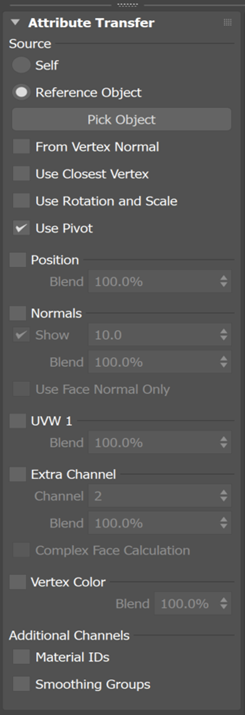
Source
Self mode: Projects attributes against the object itself, using its pivot or bounding box centroid for transformations. Self mode is only applicable to normals. It's often used for creating objects like simple foliage or tree canopies.
Reference Object mode: Picks a target object in the scene that the modified object will pull data from. Reference Object mode is perfect for transferring attributes to another object, such as UVs or vertex colors.
Note: Non-geometry objects cannot be selected as Reference Objects, with the exception of splines. Examples of non-geometry objects include lights, cameras, and world-space modifiers.
You can adjust the position, normals, UVs, and vertex colors using parameters like From Vertex Normal, Use Closest Vertex, Use Rotation and Scale, or Use Pivot.
From Vertex Normal: When active, the attributes are captured from the reference object using the modified object's vertex normals to find the closest point.
Use Closest Vertex: When active, the attributes are captured from the closest geometric vertex that is found from the reference object.
Tip: You can have both From Vertex Normal and Use Closest Vertex active. This will produce a result that uses both methods.Use Rotation and Scale: When active, the rotation and scale of the modified object will be used to align the reference object's data.
Use Pivot: When active, the modified and reference object will have their data aligned at their pivots and not their bounding box centers.
Transfer Options
Position
Position lets you change the vertex positions of an object to reflect the surface of a reference object. This adjustment doesn't move the object's location in the scene.
- Blend: Set the percentage of blending between the modified object's original vertex positions and the generated result.
Normals
Normals lets you adjust the vertex normals of the modified object. In Self mode, new normals are generated based on a spherical reference. In Reference Object mode, the normals are taken from matching locations on the reference.
- Show: Display the result of the generated normals in the viewport. You can also specify the size of the normals displayed in the viewport.
- Blend: Set the percentage of blending between the modified object's original normals and the generated result.
- Use Face Normal Only: When selected, use the average face normal instead of barycentric face normal. This offers a performance improvement at the expense of accuracy.
UVW 1
UVW 1 lets you update the UV 1 channel data on the modified object to reflect the UV 1 channel on the reference object.
- Blend: Set the percentage of blending between the modified object's original UVW 1 and the generated result.
Extra Channel
Extra Channel lets you create data for a chosen map channel (2 or higher) from the reference object.
- Channel: Set the map channel to be transferred.
- Blend: Set the percentage of blending between the modified object's source channel and the generated result.
- Complex Face Calculation: Attempt to keep the vertex values, so that they fall within a face on the same source UVW island.
Vertex Color
Vertex Color lets you apply vertex colors by allowing the transfer of color information from one object to another.
- Blend: Set the percentage of blending between the modified object's vertex colors and the generated result.
Additional Channels
Material IDs: Generate material IDs from the reference object.
Smoothing Groups: Generate smoothing groups from the reference object.
Attribute Transfer Modifier Example Workflow
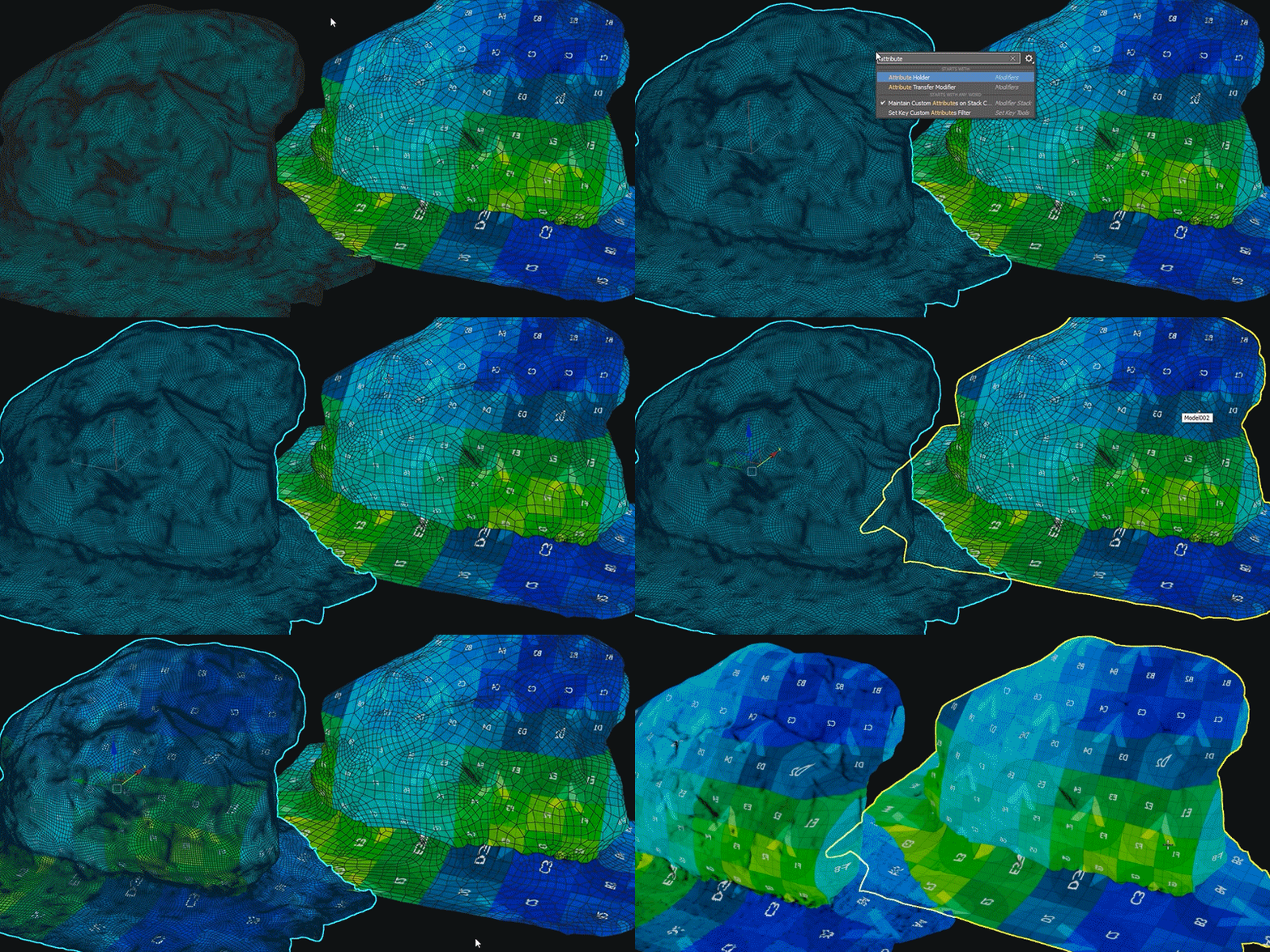
To use the Attribute Transfer modifier for UVs:
- With at least two objects in your scene, select the non-UV'd object, go to the Modify panel > Modifier List > Object-Space Modifiers, and select the Attribute Transfer modifier.
- Change the Source to Reference Object.
- Select
 and the object whose UVs you want to transfer from.
 - In the modifier, select the UVW 1 checkbox along with Use Rotation and Scale.
- Your UVs are now transferred.