Merge Tools Group
Each of the Merge tools adds a preprocessing step to the optimization process. These can help correct specific problems in a model.
Create or import an object. >
 Modify panel > Modifier List > ProOptimizer modifier > Optimization Options rollout > Merge Tools group
“Dirty” objects If a model has faces that are disconnected, but should not be, the Merge Vertices tool can correct the discontinuities and improve the optimization.
Coplanar faces If the model has surfaces that are subdivided into many coplanar (or nearly coplanar) faces, the Merge Faces tool can simplify these planes, leading to better optimization.
Interface
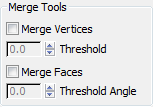
Merge Vertices
When on, merges vertices before performing the optimization. Default=off.
Threshold Sets the distance within which vertices are merged. This distance is based on a percentage of the size of the object’s bounding box. At the Threshold value of 0.0, the distance is about 0.0001 percent of the bounding-box size. At the Threshold value of 100.0, the distance is about 5 percent of the bounding-box size. Range=0.0 to 100.0. Default=0.0.
Merge Faces
When on, merges coplanar (or nearly coplanar) faces before performing the optimization. Default=off.
Threshold Angle Sets the angle between face normals within which faces are merged. Range=0.0 to 10.0. Default=0.0.
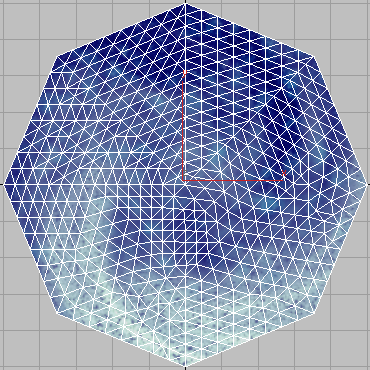
Original model
Vertices: 557
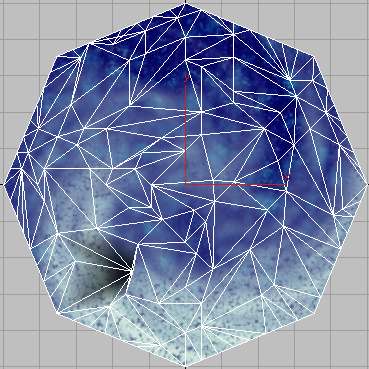
Merge Faces turned off
Vertex % = 25.0
Vertices: 139
Faces: 214
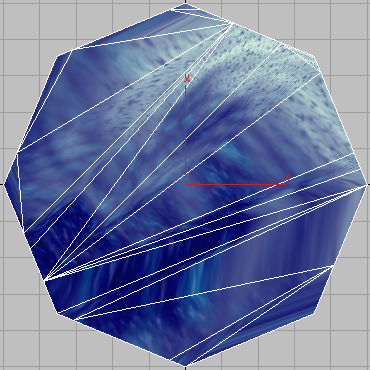
Merge Faces turned on
Vertex % = 25.0
Vertices: 23
Faces: 21
When a model has coplanar faces, Merge Faces can greatly improve optimization.