GEOMETRYCLEANUPOPEN (Command) Find
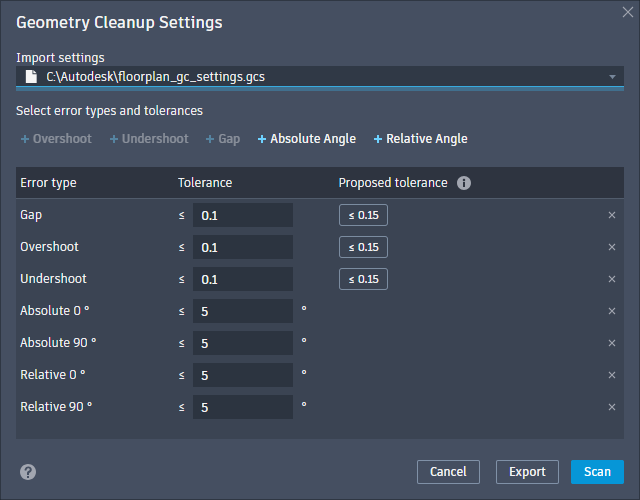
The Geometry Cleanup Settings dialog box allows you to customize which geometry errors are found, set tolerance values for each error type, and manage settings templates. Settings are saved in the user profile and can be imported or exported as .gcs files for future use.
List of Options
The following options are displayed.
- Import Settings
-
- Select a file
-
Opens the Load Settings file browser to select and import a .gcs settings file.
- Select a file field
-
Displays the file path of the current .gcs settings file. No file path is displayed if the default settings are being used.
- Select Error Types and Tolerances
-
- Error Type
-
Only errors listed under Error type are included in the scan. Removing unnecessary error types will speed up the scanning process.
Available error types:
- Overshoot: Endpoint of a line or polyline extends beyond a given shape.
- Undershoot: Endpoint of a line or polyline stops short of a given shape.
- Gap: Endpoint of a line or polyline should have coincided with another point, but it didn't.
- Absolute Angle: Line or polyline is slightly off from a standard UCS angle 0, 90, or 180 degrees relative to the current User Coordinate System.
- Relative Angle: Two intersecting lines or polylines do not meet at the intended standard angle, 90 degree for perpendicular or 45 degree for diagonal.
Note: Overshoot, Undershoot, and Gap errors can be toggled on or off. Absolute Angle and Relative Angle errors can be added with custom angle values from 0° approaching 180°. There is no limit to how many Absolute Angle and Relative Angle errors can be added, but duplicate values will not be processed. - Tolerance
-
Sets the threshold for identifying each error type. Tolerance values must be a number greater than 0.000100. Tolerance is unitless for length based errors and uses degrees for angle based errors.
- Proposed Tolerance
-
Proposed tolerance values are based on the entire drawing's geometry.
- Remove (X)
-
Removes the selected error type from the scan.
- Cancel
-
Closes the Geometry Cleanup Settings dialog box without saving changes.
- Export
- Opens the Save Settings file browser to export the current settings as a .gcs file.
- Scan
- Scans the current drawing for geometry errors using the selected error types and tolerances.
Note: After the first scan, the Scan button changes to Rescan for subsequent scans.