Connected References improves the workflow for updating the paths of missing external drawing references (xrefs).
When working with drawings that contain references, the new Missing toggle allows you to switch to the Missing References view in the File References pane. This view exclusively shows missing external drawing reference (xref) files.
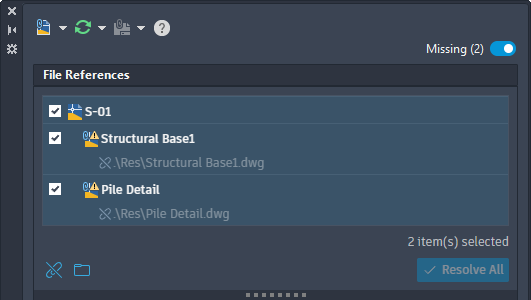
From the Missing References view, you can perform the following tasks on selected missing references:
- Detach references that are no longer needed
- Update the paths of references by browsing and specifying a new path
- Resolve the paths of references based on suggested paths (applies to drawings opened from an Autodesk project only)
Suggested Path for References
Normally, when a referenced file is renamed or moved, any drawing that depends on it can no longer locate it because its path has changed. As a result, you must update the path for each missing reference to load it properly into AutoCAD.
With Connected References and referenced drawing (xref) files stored on Forma Data Management, the External References palette automatically attempts to locate missing reference files that have been renamed or moved. When a missing reference file is found, a suggested path is displayed, which you can accept to avoid manually updating each missing reference.
Changed Commands
EXTERNALREFERENCES - Opens the External References palette.