Forma Data Management Essentials streamlines collaborating with others on your projects.
Forma Data Management (formerly Autodesk Docs) helps you organize project files and folders for every stage of your work. Use it to share drawing files, publish sheets, review designs, create transmittals, and track issues.
To use Forma Data Management with AutoCAD, make sure to install the latest version of Desktop Connector. To do this, see Install Desktop Connector.
This release includes improvements that make it easier than ever to get started with Forma Data Management:
- Forma Data Management Essentials
- Ability to view unsynced projects
- Learning content panel
- Enhanced AutoCAD features in Forma Data Management
Forma Data Management Essentials
AutoCAD and Civil 3D subscriptions now include Forma Data Management Essentials, which provides a centralized location for project information to help teams stay connected.
Key features are:
- Online drawing file collaboration
- Permission-controlled access
- File versioning
- File sharing
- File review tools
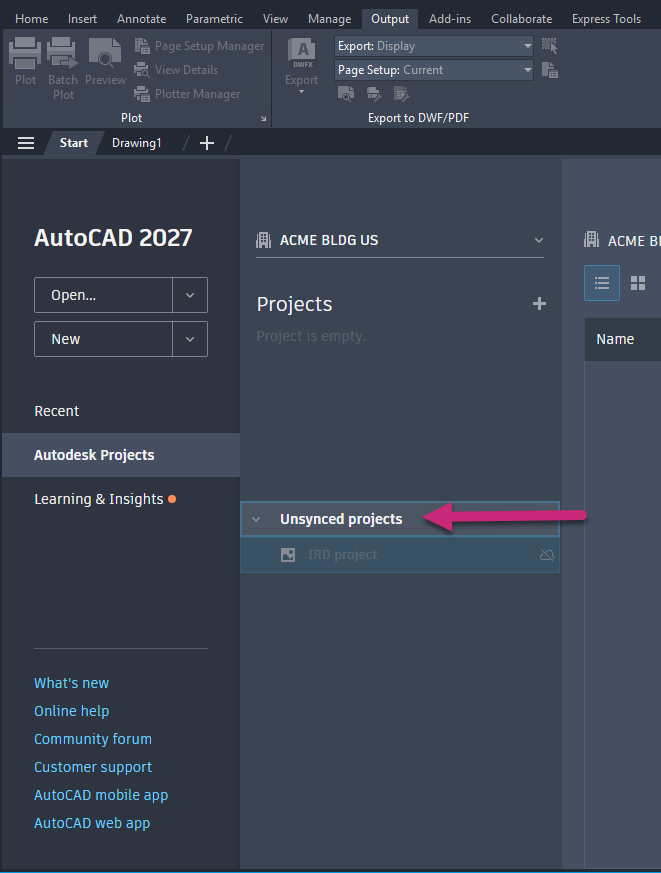
View unsynced projects
You can now see all projects of which you are a member, including those not yet synced. To access files from an unsynced project, use Desktop Connector to sync them to your computer.
Learning content panel
In the Autodesk Projects tab, you’ll find a panel with learning resources for Forma Data Management. It includes details about AutoCAD features now enhanced for working with drawings stored in Forma Data Management.