Improvements were made to Markup Import and Markup Assist, namely when importing markups from Forma Data Management to AutoCAD, making it easier for drafters to incorporate revisions.
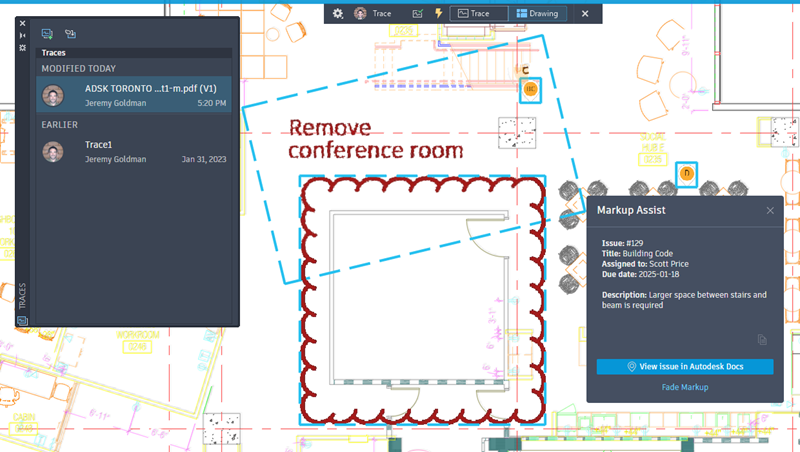
Markup Assist for markups created in Forma Data Management
Markup Assist can now detect text, strikethroughs, and boundary markups (which can be inserted as revclouds) on PDFs that are imported and synced from Forma Data Management.
To use Markup Assist with your published Forma Data Management markups:
- After publishing markups on Forma Data Management, open the associated trace.
- Click the Drawing button on the Trace toolbar to switch to TRACEBACK mode.
Markup Assist can now detect markups on a PDF that weren't created in Forma Data Management
In the previous release, once a PDF was uploaded to Forma Data Management, any existing markups on the PDF (for example, markups created in Adobe or with another markup software) could not be detected by Markup Assist, and instead were only visible as part of the background image that was overlaid in the Trace workspace. In this release, Markup Assist can now detect these types of markups.
View Forma Data Management Issues in AutoCAD
Issues created and published on a PDF markup on Forma Data Management can now be viewed in AutoCAD.
Other updates
- Improvements were made to the task dialogs when importing markups from Forma Data Management.
- When importing markups from Forma Data Management, the default name of the associated trace now contains the name of the PDF and a version number.