Use the Storage tab to review stage storage depths, area, and calculated volume of the pond at each depth.
General
- Total Volume
-
Total volume of the pond.
- Storage Volume
-
Specifies the volume from the bottom of the pond to the freeboard depth.
- Freeboard
-
Specifies a depth from the top of the pond that determines how close the water level can rise to the top before indicating a flood risk.
Stage Storage
-
Export Storage Data

-
Exports the stage storage table as a *.csv file. When clicked, specify a name and destination for the file as well as which stage data should be included.
- Depth Increment/User-defined
-
Specifies whether stages are defined by consistent increments, or by user-defined depths.
When User-defined is selected (surface-based ponds only), manual entry of stages between the top and bottom of the pond is enabled.
 Adds a row to the stage table. Specify the stage depth and the remaining properties will populate for that depth.
 Removes a selected row from the stage table.
- Depth Increment
-
The consistent depth between each depth stage.
- Calculation Method
-
Specifies the storage calculation method for the pond. Select Surface volume, Conic approximation, or Average end area. Refer to the About Pond Storage Calculation Methods section below for more information. If the pond was created from a surface, Surface volume is applied.
- Depth
-
Specifies a stage depth within the pond.
- Elevation
-
The elevation of the stage depth of the pond.
- Incremental Storage
-
Specifies the volume capacity at the stage depth of the pond.
- Porosity
-
Specifies the percentage of the pond that is available for storage. This is dictated by the type of fill material that is used, i.e. 100% if empty or typically 30% for rubble.
- Volume
-
Specifies the cumulative volume capacity at the stage depth of the pond.
- Storage Area
-
Specifies the area of the stage depth of the pond.
- Storage Curve
-
Displays a visualization of the comparative storage area to volume curves for the pond. Place your cursor at various depths to see the actual storage area and volume calculated for that depth.
About Pond Storage Calculation Methods
There are several methods available to calculate storage curve data depending on the type of pond. For conceptual ponds, you can choose one of three methods: Surface Volume, Conic Approximation, or Average End Area. For surface-based ponds, the Surface Volume method will always be used and cannot be changed.
These three calculation methods have different formulations as described below.
Surface Volume Method
The Surface Volume method uses a surface model to calculate bounded volumes and surface areas for the fill within the pond at each sampling depth. This method produces accurate volumes and storage areas for all pond types.
Conic Approximation Method
The Conic Approximation method is a way to approximate the volume between two sectional areas and is equivalent to calculating the volume of a frustrum. When using this method, the incremental volumes for a conceptual pond are calculated using the areas of the contours. Given two contours, their areas are summed along with the square root of their product and multiplied by a third of the vertical distance between the contours to determine the volume.
The Conic Approximation method is expressed by the following equation:

where V is the volume, calculated from the two contour areas A1 and A2, and the vertical distance h between the two contours.
Average End Area Method
The Average End Area method approximates the volume between two sectional areas. When using this method, the incremental volumes for a conceptual pond are calculated using the areas of the contours. Given two contours, their areas are averaged and multiplied by the vertical distance between them to determine the volume.
The Average End Area method is expressed by the following equation:
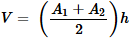
where V is the volume, calculated from the two contour areas A1 and A2, and the vertical distance h between the two contours.