Add depth increments to adjust the pond capacity.
Adding slopes to your pond modifies its slope and general capacity. By default, the pond is created with two contours: the top and the bottom contour. The Pond Properties Dialog box allows you to add interior contours between the default ones. Existing slopes can be further edited for greater accuracy.
Add a Side Slope to a Pond
- Select the pond.
- Click Pond tab
 Edit Geometry panel Add Side Slope
 .
.
- Select a contour that will be adjacent to the contour.
- Move the cursor to the desired slope width. The new slope area is highlighted in light blue.
- Click to set the desired width.
- The new contour is placed as specified using the existing slope of the pond.
| Pond selection | Contour selection | New slope contour |
|---|---|---|
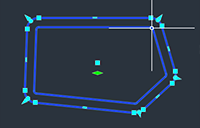
|
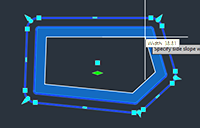
|
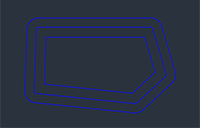
|
Edit a Contour in a Pond
- Select the pond.
- Click Pond tab Edit Geometry panel Quick Edit Pond
 .
.
- Hover the cursor over the side slope to edit the slope. The direction of the arrow indicates which direction to edit the slope.
- To edit the elevation of a contour, hover the cursor over that contour, then click to specify a new value.
Remove a Contour from a Pond
- Select the pond.
- Click Pond tab Edit Geometry panel Delete Contour
 .
.
- Select one or more contours to remove.
- Press Enter.
Reviewing the Pond Storage Capacity Properties
- To open the
Pond Properties dialog box, select the pond and click Pond tab Modify panel Pond Properties
 .
.
- Click the Storage tab. The Storage tab displays the total volume, the storage volume, and a table and a storage curve graph that details the stage storage depths of the pond from top to bottom.