Add variable Known Rainfall data to test and analyze a drainage system.
Known Rainfall uses unique hyetograph data, including historical rainfall gauge data, to flexibly define sets of rainfall events.
- In the Analysis Criteria workspace, click Open Rainfall Manager.
-
In the Rainfall Manager, click the Known Rainfall tile.
The Known Rainfall Creation editor opens.
- In the Name field, enter a unique name for the rainfall set.
Note: At least one rainfall event must be entered before the rainfall set can be saved.
To Create a Known Rainfall Set
Hyetographs depict rainfall intensity and/or depth over time, showing how rainfall changes during a storm. This data is crucial for enabling engineers to analyze patterns and predict flood risk to design stormwater infrastructure.
- In the Known Rainfall Creation workspace, click Add Rainfall Event to begin creating events for the rainfall set. The Adding Rainfall Event editor displays.
- In the Name field, enter a unique name for the rainfall event.
-
Click import rain data to import a csv file containing rainfall data.
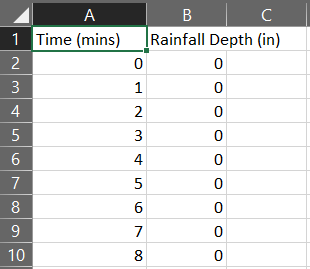 Note: The data format of the rainfall csv file must adhere to the following:
- Two columns of data are required. Multiple columns are possible, but only first two are considered.
- The first row is considered as header data.
- The data is limited to 2-25,000 rows of numeric data.
- Only numerical data is allowed for rainfall data rows. Empty cells, strings, alphanumeric signs, and other characters are considered invalid.
-
The data is then presented in a table and a hyetograph.
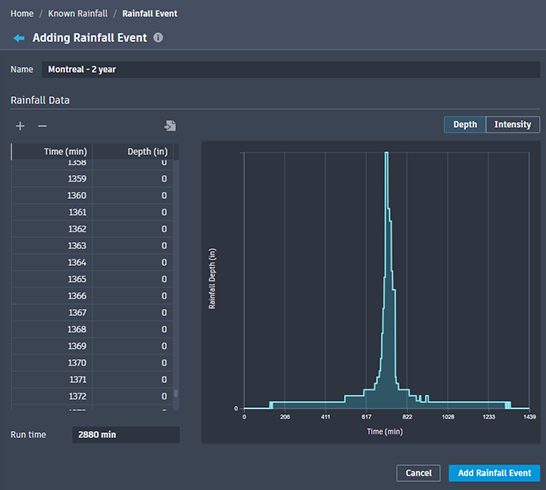
The table and hyetograph can display either Depth or Intensity data. Data displays using the units defined in the source drawing.
Note: There must be at least 2 entries containing the minute increment and its coinciding rain depth in inches (or millimeters depending on drawing units). -
Click Add Rainfall Event to add the event to the Known Rainfall set. The Known Rainfall Creation editor displays showing the updated Rainfall Events List.
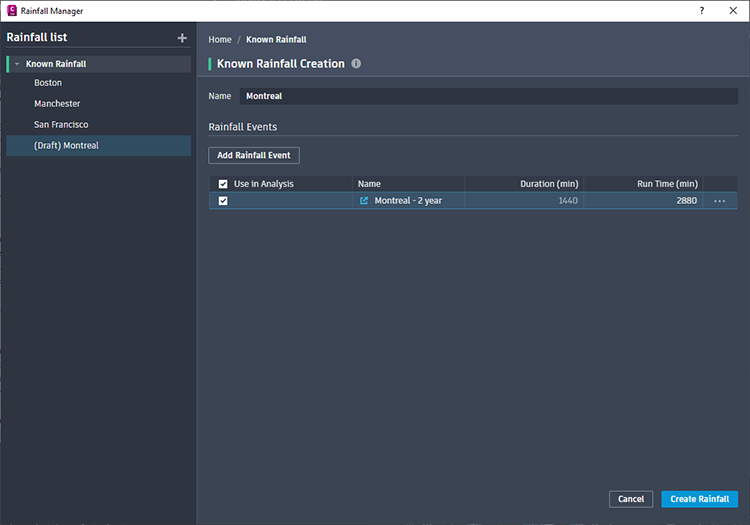
- Click Create Rainfall to save the Known Rainfall set. The Rainfall List displays the new Known Rainfall set.
To Modify Known Rainfall Sets
- In the Known Rainfall List, select the set to be modified. The Known Rainfall editor displays.
- Rename the set or add additional Rainfall Events.
- Modify Known Rainfall events.
- Click Save Changes.
To Modify Known Rainfall Events in a Set
- In the Known Rainfall List, select the set containing the event to be modified. The Known Rainfall editor displays.
Tip: In the Rainfall Events table, it is possible to modify the following:
- Click into cells to manually change Names and Run Times.
- Delete a Rainfall Event by clicking

 Delete.
- In the Name column, click
 Open Rainfall Event or click
Open. The Rainfall Event Editor opens. The following modification options are available.
Open Rainfall Event or click
Open. The Rainfall Event Editor opens. The following modification options are available.
- Rename the event.
- Click into Time cells to change the minute moment of an entry. (The Time column is always in numerical order, so the entry will relocate accordingly.)
- Click into Depth cells to change the rainfall measurement of an entry. (Intensity for the entry will adjust to the new depth.)
- Click into Intensity cells to change the rate of an entry. (Depth for the entry will adjust to the new rate.)
- Click the
 and
and
 buttons to add and remove entry rows.
- Click
 to import a csv file containing rainfall data. (This will overwrite all existing data in the Rainfall Event.)
- Change the Run time for the Rainfall Event.
- Click Save Changes.