Horizontal Regression Analysis (HRA) (released in 2026.1) fits a design alignment (tangents, curves, spirals) to survey so you get a best-fit Civil 3D alignment from existing data.
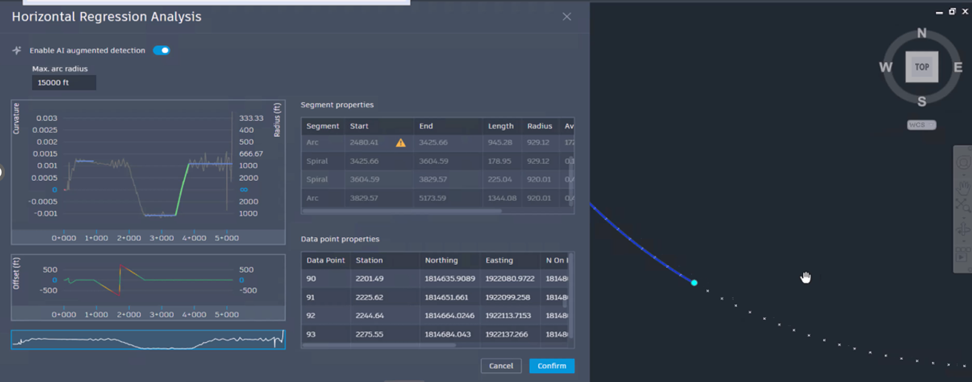
Alignment Preview
- Civil 3D now displays a visual preview of the regression alignment directly in the drawing during Horizontal Regression Analysis (HRA). The proposed alignment is generated from the engine output, georeferenced to the drawing coordinates, and dynamically linked to the Curvature Plot and Segments Table for cross-highlighting and inspection. This allows you to validate the regression result before creating the final alignment.
- Horizontal Regression Analysis automatically generates a Civil 3D alignment as part of the workflow, enabling you to inspect, refine, and edit the regressed geometry using standard Civil 3D alignment tools.
- Horizontal Regression Analysis now supports modeless operation, allowing you to zoom, switch drawings, inspect points, and edit alignments without closing the HRA dialog box.
- Grouped entities can be added to the preview alignment. Each entity within a group is displayed separately, providing full visibility into all alignment components.
- When algorithm settings or detection parameters are modified, the regression alignment is automatically regenerated. If the preview alignment is deleted during an active HRA session, Civil 3D recreates it using the current settings.
- Selecting entities in the Curvature Plot, Segments Table, or Data Table highlights the corresponding alignment segments in the drawing, improving correlation between regression results and drawing geometry.
- Zoom to and Pan to options are available in the Curvature Table context menu to quickly center and fit selected alignment elements in the drawing window.
- If the Preview Alignment is manually deleted, it is automatically regenerated using the default algorithm or Machine Learning parameters. Any manual adjustments are not retained.
- If a drawing is saved during an active Horizontal Regression Analysis session and the session is canceled, the temporary alignment is removed while other user inputs remain preserved.
- The centerline is displayed only when both Path 1 and Path 2 are selected and remains visible during Regression Analysis. It is saved with the final alignment. To create a centerline from a single path, assign the same point group to both paths.
Machine Learning Based Detection
- Civil 3D now provides a Machine Learning based detection option for Horizontal Regression Analysis, in addition to the existing Classic detection method. This AI powered capability offers an alternative when traditional algorithms are less effective.
- A toggle in Horizontal Regression Analysis allows you to switch between Classic and Machine Learning based alignment detection.
- When switching between detection methods, a notification clarifies that the AI model is pre-trained and does not use or learn from customer data.
- Detection results are automatically recalculated when changing between Classic and Machine Learning algorithms to ensure the output reflects the selected model.
- Switching algorithms may remove previously applied individual adjustments, and users are notified of this impact.
Miscellaneous Improvements
- Horizontal Regression Analysis in Civil 3D has been updated for the 2027 release with improved stationing consistency, refined user interface elements, and increased data accuracy.
- Tooltips have been added to table headers to clarify that station values are measured along the survey data alignment.
- The Curvature Plot and detected geometry now share a unified stationing reference based on actual survey measurements. This ensures consistent station values across plots and tables, accurate positioning of detections, and clear gaps where survey data is missing.
- Offsets are calculated perpendicular to alignment entities, and stationing is adjusted accordingly. When perpendicular offset calculation is not possible, the user interface displays a dash (-) value.