Batch
Navigation
 When navigating from one node to another, if the newly selected node cannot show the same view as the previously selected node, the viewport temporarily shows a valid input or output view, depending on what was previously shown.
For example, if an Action node is selected and a viewport shows the Result view, then a GMask Tracer node with only an OutMatte output is selected, the viewport temporarily shows the OutMatte. If the Action node is selected again, the Result view is restored.
Nodes Bins
Nodes highlighted by pressing the key corresponding to their first letter are centred in the Nodes bin, when possible.
The Reset function of a custom bin now resets its contents to the factory default instead of clearing the bin.
Markers
Indicators
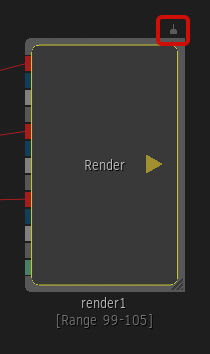
Nodes with at least one marker display an indicator above the node in the Batch Schematic when Show Node Indicators is enabled in the Batch & BFX tab of the User Preferences.
Filtering the Explorer
Use the Node filter in the Markers tab to display only markers from specific nodes.
| Select: | To show: |
|---|---|
| All Nodes | Markers from all nodes. |
| Selected Nodes | Markers from the selected nodes. |
| Current Node and Current Clip Node | Markers from the current node and current clip node. |
| Selected Nodes and Context | Markers from the selected nodes and from the context views selected in the Timebar Options drop-down. |
| Current Nodes and Context | Markers from the current node, current clip node, and from the context views selected in the Timebar Options drop-down. |
| Context Views | Markers from all nodes with a context view set on them. |