This dialog is used when exporting results to GIS format for one or more simulations. It is used to select whether to export time varying results and/or maximum results.
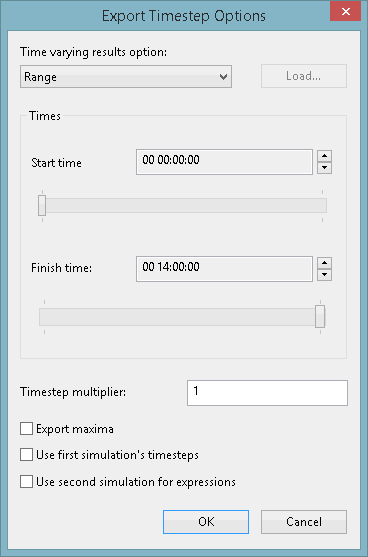
Select an option for exporting time varying results:
- None - do not export time varying results
- Single - export results at a single timestep. Select the timestep for which results are to be exported using the slider bar or using the up and down arrows next to the Time display.
- Range - export results at multiple timesteps. Select the range of times for which results will be exported using the Start Time and Finish Time controls. Results for timesteps at the interval specified in the Timestep multiplier field will be exported within the selected range.
-
List - export results at timesteps loaded from a .csv file. Click Load to select a csv file containing either:
-
Timestep numbers starting at 1
-
Date/times in the format matching the times displayed on the sliders on the dialog when exporting a single timestep or range of timesteps
The file may contain comments beginning with # either at the beginning of a line or after the value, and may contain blank lines.
-
- All - export results for all the timesteps at the interval specified in the Timestep multiplier field.
Check the Export Maxima box to export maximum results files.
Check the Use first simulation's timesteps box to use the timesteps from the first simulation. This option is only enabled if a Range or All timesteps have been selected from the Time varying results option list, and if the results of two or more simulations were selected for export in the Export to GIS dialog. If checked, then for each simulation, InfoWorks ICM finds the first timestep at or after the first simulation's first timestep and the last timestep at or before the last timestep in the first simulation. Then, using the interval specified in the Timestep multiplier field, it interpolates between the two, and exports accordingly. If unchecked (default), the results from the other simulations are only exported at timesteps where a simulation has result output for that time.
Check the Use second simulation for expressions to use the expressions from the second simulation. The option only appears if the results of two simulations were selected for export in the Export to GIS dialog. If unchecked (default), the expressions from the first simulation will be used.
- For simulations using relative times, time will be displayed in the format d hh:mm.
- For simulations using absolute times, time will be displayed as the date followed by hh:mm:ss.
In order to export results at time multiples of seconds it is necessary to use absolute times when carrying out the simulation.