Running a Ruby script can help automate the editing of a network in InfoWorks ICM.
You can use the Ruby script editor to view and edit a Ruby script, to validate its syntax and to run the script in a network.
See Working with Database Items for details about creating, opening, importing and exporting a Ruby script and other relevant database item functions, and Introduction to Ruby Scripting in InfoWorks for general information about Ruby scripting in InfoWorks ICM.
Running Ruby scripts
Ruby scripts can be run in the current network in the GeoPlan by:
- Clicking Run in the Ruby script editor. If the Ruby script references other scripts in the Model or Live group, these are run in the order they are listed in the opened script.
- Dragging a single Ruby script from the
Explorer window onto the network.
A message is displayed asking if you want to a run the Ruby script. Selecting Yes runs the script. If the Ruby script references other scripts, these are run in the order they are listed in the script.
- Dragging multiple Ruby scripts from the same
Model or Live group in the Explorer window onto the network.
An error message is displayed if the selected scripts do not belong to the same group.
If they are all in the same group, a message is displayed asking if you want to apply all of the selected Ruby scripts. Selecting Yes runs the selected ruby scripts in the order they appear in the group.
- Including it in a shared or custom action as a database item. See Customs Actions for details.
All Ruby scripts in the same Model or Live group, are automatically exported to your local working folder as RB files when a script is run.
If the Ruby script is run successfully, a Script output window is displayed, listing the changes that have been applied. An example is shown below:
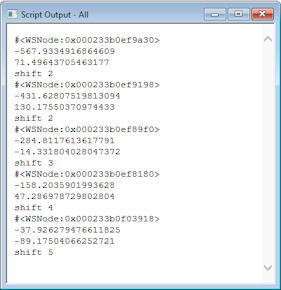
If it is not run successfully, a message is displayed, which indicates the likely error and the name of the folder the failed Ruby script file is exported to.
Ruby version and compatibility
InfoWorks ICM uses Ruby 3.4.6 to run scripts:
- Some behaviour from earlier Ruby versions is no longer supported. Scripts created with earlier Ruby versions may not run as expected and may require updates.
- Some functionality previously provided by the Ruby standard library may now be delivered via RubyGems.
- External libraries can be installed and used through RubyGems.
Test existing scripts under Ruby 3.4.6 and update them if required.
Gems can be installed programmatically using the RubyGems API (for example, using Gem.install). Install gems only from trusted sources.
For information about Ruby language changes and migration, refer to the official Ruby documentation: