An existing InfoWorks network and/or a SWMM network can be defined as a template network and can be used as basis for a new network. All network objects, such as subcatchments, ponds and river reaches, defined in the template network, will be automatically inherited by the new network if InfoWorks ICM is instructed to use the template network when a new network is created.
To define an existing InfoWorks network and/or an existing SWMM network as a template network
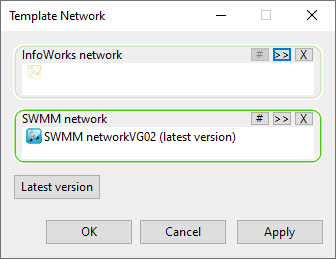
- Select the Template network option from the Tools menu.
- Drag an existing
InfoWorks network from the tree view in the
Explorer window to the
InfoWorks network drop target in the dialog or drag a
SWMM network to the
SWMM network drop target. Alternatively, use the
 (Browse) button in the applicable drop target to search for the relevant network from the
Common Tree Selection dialog.
(Browse) button in the applicable drop target to search for the relevant network from the
Common Tree Selection dialog.
If a network has already been selected to be used as the template, ie, its name is already displayed in the drop target, then this will be replaced when the new network is dropped into the target box.
- If you want to use a particular version of the selected network, select the
 (Version) button to search for it. A
Select Commit dialog is displayed from which you can select the required version.
(Version) button to search for it. A
Select Commit dialog is displayed from which you can select the required version.
- If you want to always use the latest version of the selected network, click on the Latest version button. This ensures that any new networks will be based on the latest committed version of the template networks, regardless of the versions currently selected.
- If you want to use a particular version of the selected network, select the
- Click on OK to save the changes.
The Template Network dialog is displayed
To delete a template network, select the
 (Delete selection) button in the applicable drop target. Any networks which were created using the deleted template network will not be affected by the change.