About Inventor and Fusion Interoperability
Sharing Inventor and Fusion files.
What's New: 2022, 2023, 2027.2
- A Fusion hub is required to share Inventor part files with Fusion. You are asked to specify a hub and project when you send a file to Fusion.
- The Fusion project is where the Inventor part files are stored. After you upload a file, you can view the file in the Fusion web client or open it in the Fusion desktop client if it is installed.
- Fusion requires internet access.
Send Inventor Parts and Assemblies to Fusion
These Fusion commands expedite the process of getting data to Fusion for use in various studies, simulations or work setups. Desktop Connector is not used for this workflow.
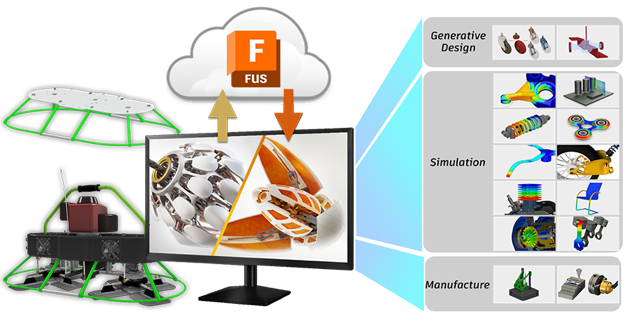
When you activate a Fusion command in the Fusion tab, the Fusion Interoperability displays an introduction page. The page explains the purpose and requirements of the selected command and, when available, links to examples.
Clicking Continue brings you to the data panel where you specify parts, and the Fusion web client and location for the data. When ready, click Upload and the Inventor data is pushed to Fusion web client. In Fusion web client you see an IPT file. The F3D file is generated when the IPT is opened in Fusion.
For the uploaded data, you can:
- View the data in a web browser
- Open the data in Fusion, in the appropriate workspace and ready to define the study or process
AnyCAD Workflow
Use an AnyCAD workflow to open Fusion designs in Inventor, or Inventor parts and assemblies in Fusion.

The following is required to use an AnyCAD workflow to open Fusion designs in Inventor or Inventor parts and assemblies in Fusion:
A Fusion hub. A Fusion hub is where Fusion (.fusiondesign) or Inventor files are stored so they can be shared.
Note: Fusion designs can only be opened from a Fusion hub to which you have been granted access.Desktop Connector must be installed locally on your computer. Desktop Connector creates a local Fusion drive on your computer that provides access to .fusiondesign. iam, and .ipt files in your Fusion project.
Subscription to one of the following products: Fusion, Product Design and Manufacturing Collection, or Product Design Suite.
For more information, see: To Import Fusion Files as an AnyCAD Reference Model.