Excel Codeblocks Reference
What's New: 2027
The Excel category in Codeblocks provides visual programming blocks for working with Microsoft Excel files and data within your Autodesk Inventor iLogic workflows. Use these blocks to read data from spreadsheets, write calculation results to Excel files, and automate data exchange between Inventor and Excel.
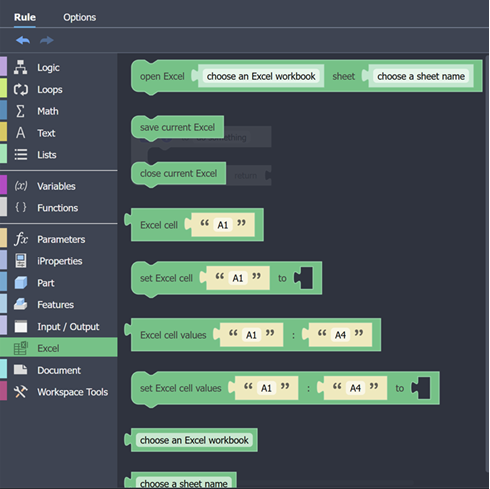
Open Worksheet
Opens specified workbook and sets the active worksheet to be referenced by the other blocks.

Save Workbook
Saves the active workbook.

Close Workbook
Closes the active workbook.

Get Cell
Gets the value of the specified cell in the active worksheet.

Set Cell to
Sets the value of the specified cell in the active worksheet.

Get Cell Range
Gets the value of the specified cell range in the active worksheet. This returns a list.

Set Cell Range
Sets the value of the specified cell range in the active worksheet. The value should be a list.

Choose Workbook
Specifies the workbook. Choose from list of workbooks in the active document.

Choose Worksheet
Specifies the worksheet in the active workbook.