Functions Codeblocks Reference
What's New: 2027
The Functions category provides blocks for defining and calling custom procedures, with support for parameters and return values. Use these blocks to modularize and reuse logic within your visual program.
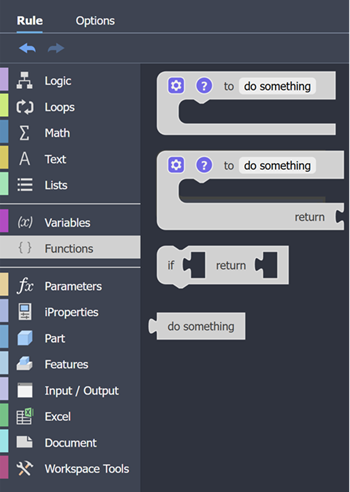
Function Definition
The 'function definition' codeblock is used to create a reusable module of code, which performs a specific task.

This codeblock is used to 'call' (or 'run') the Function. The calling codeblock can be placed into the rule multiple times, to run the Function when needed.
The 'function definition' codeblock can accept inputs, and process them. Each input is saved into a variable, there can be multiple variables.
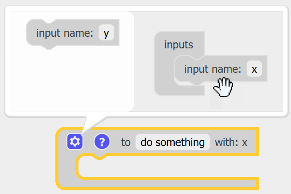
 to add an input to the function. Then, drag the input modifier onto the Inputs block. Specify an input name. The do something codeblock updates. Drag an input out of the function window to remove it.
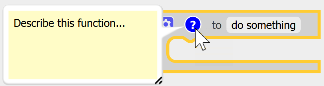
Click on '?' to provide information about the function.
Function Definition with Return
The function definition with return codeblock is used to create a reusable module of code, which performs a specific task, and then supplies an output.
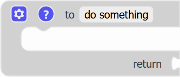
This codeblock is paired with a getting type of Codeblock, which is used to 'call' (or 'run') the Function. The calling codeblock can be placed into the rule multiple times, to run the Function when needed.
The function definition with return Codeblock can accept inputs, and process them. Each input is saved into a variable, there can be multiple variables.
to add an input to the function. Then, drag the input modifier onto the Inputs block. Specify an input name. The function definition with return codeblock updates. Drag an input out of the function window to remove it.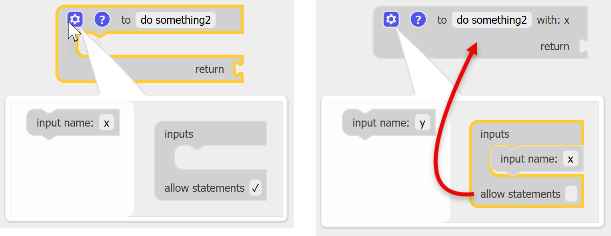
Deselect allow statements when the function only evaluates the input and returns a result.
Click on '?' to provide information about the function.
If True Return
The 'if true return function' codeblock returns a value if it's input is True.

The 'if true return function' codeblock can be used to test an input value is of the expected type or value.
Function Call
Function calls are generated when you add a function codeblock to the rule. The default name can be changed.
