iProperties Codeblocks Reference
What's New: 2027
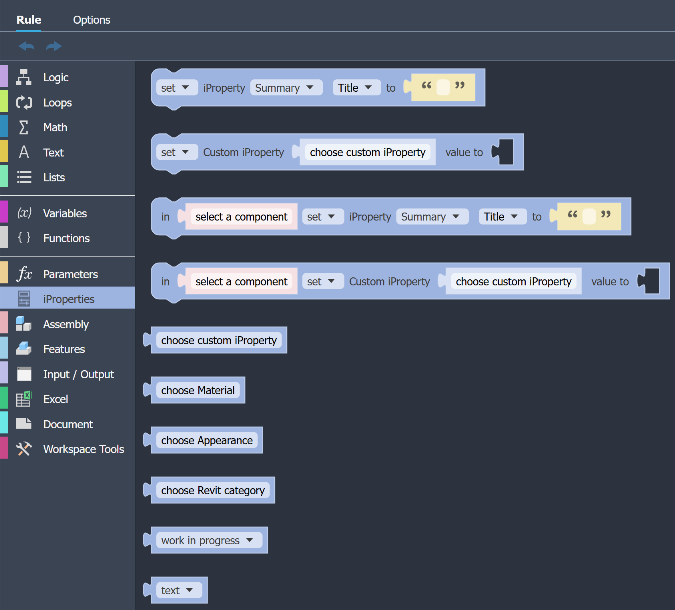
The iProperties category provides blocks to get and set Inventor iProperties, plus search blocks for custom properties, materials, and appearances. Codeblock options are contextual, that is, the available options are based on the active document type. All documents, excluding presentations, get a base set of options, 3D models have additional options, and assemblies have yet a couple more options.
All Documents
The following codeblocks are accessible in any Inventor document.
Standard iProperties
Get or Set standard and physical iProperties in the active document.

Available iProperties:
- For Summary there are Title, Subject, Author, Manager, and Company
- For Project there are Part Number, Stock Number, Description, Revision Number, Project, Designer, Engineer, Authority, Cost Center, Estimated Cost, Vendor, Web Link, and Revit Category
- For Status there are Part Number, Stock Number, Status, and Design State
- For Physical there are Mass and Volume
Custom iProperties
Get or Set custom iProperties in the active document. Custom iProperties must have first been added to the document. If no custom iProperties exist, the list is empty.

Choose Custom iProperty
Returns the name of the selected custom iProperty.
Choose Revit Category
Returns the name of a Revit Category.

Choose Design State
Returns a possible value of the Design State iProperty. Available values are work in progress, pending, and released.

Choose Value Type (Custom iProperty)
Returns a possible value type of the custom iProperty. Available types are text, real number, integer, boolean, and date.

Parts
Part models have the above iProperty codeblocks, plus the following:
Choose Material
Displays the list of Materials in the active document. You select the desired material.
Choose Appearance
Displays the list of Appearances in the active document. You select the desired appearance.
Assemblies Only
Assemblies have all of the above iProperty codeblocks, plus the following:
Assembly Standard Properties
Selects an assembly component, and then gets or sets standard or physical iProperties of that component.

Assembly Custom Properties
Selects an assembly component, and then gets or sets custom iProperties in the selected component.
