Logic Codeblocks Reference
What's New: 2027
The Logic category provides essential building blocks for creating conditional statements and boolean operations in your visual programs. Use these blocks to make decisions, compare values, and control program flow based on true/false conditions.
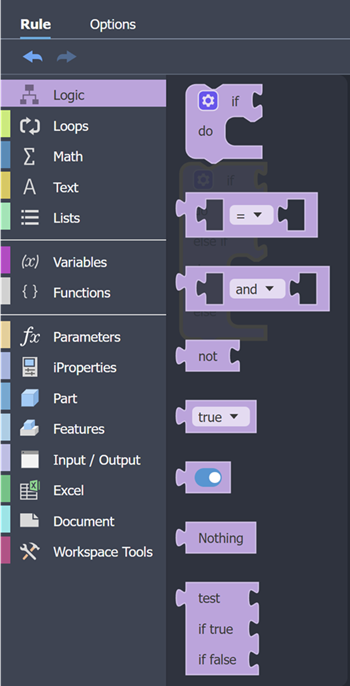
Logic codeblocks are used to create "if-then-else" statements and other conditional logic.
If
If codeblocks are used to create conditional logic for input forms and rules. They are use to define specific actions or behaviors that are triggered based on whether a condition is met.
- If - this condition is True, Then - do this action.
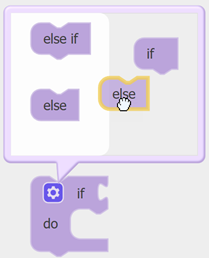
If codeblocks can include additional 'Else' statements, which allows multiple conditions to be validated.
If - this condition is True, Then - do this action.
Else
If - this other condition is True, Then - do this other action.
Note: Click the icon to display the block modifiers. Drag and drop the modifier onto the codeblock to use it. Drag it out of the codeblock to delete it.
Else modifiers can be used to create conditional logic for input forms and rules. They are used to define specific actions or behaviors that are triggered based on whether a condition is met.
If-else can return an action, when the condition is not evaluated as True.
IF - this condition is True, Then - do this action.
Else - do this other action
The Else-if modifier can include additional 'else' statements, which allow multiple conditions to be validated.*
If - this condition is True, Then - do this action.
Else if
- this other condition is True, Then - do this other action.
Else if
- none of the conditions are true, do this remaining action.
Compare Codeblock
The Compare codeblock compares two inputs and returns True if the inputs satisfy a comparison operator.

- The inputs can be numbers and text (strings).
- The operators are: equal, not equal, less than, less than or equal, greater than, greater than or equal.
Logical Operator Codeblock
The Logical Operator Codeblock combines two inputs and returns True depending on the operator.

- The 'and' operator returns True if both statements are true.
- The 'or' operator returns True if either of the statements are true.
Not Codeblock
The Not codeblock converts a boolean to its opposite.

- An input of True, will return an output of False.
- An input of False, will return an output of True.
Boolean Codeblock
The Boolean codeblock acts as an input, with a choice of 'true' or 'false'.

Or, if you prefer a graphical representation of the boolean use this codeblock

Nothing Codeblock
The Nothing codeblock (null) provides the means to handle invalid input.

Test Codeblock
The Test codeblock is a tool to evaluate and validate an output.
