Parameters Codeblocks Reference
What's New: 2027
The Parameters category provides blocks to Set or Get Inventor parameters in both part and assembly.
In an assembly rule, all parameter blocks are available. Select the desired parameter attribute — Unit/Type, Value, Expression, Key, Export, or Comment — from the dropdown.
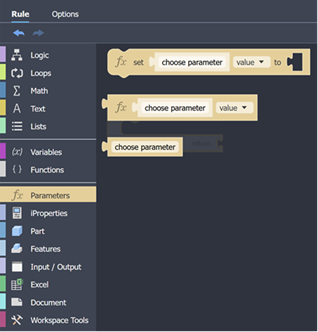
Parameter Codeblocks represent the parameters in the Inventor model that can be used in the rule.
Uses of Parameter Codeblocks
Parameter codeblocks are used to:
- Set a parameter value
- Set a parameter equation using expression
- Set parameter key and export attributes
- Use a parameter as input
- Use a parameter attribute as input
- Set the value of a component parameter in an assembly
- Use assembly component parameter attributes as input
All Documents
These blocks can be used in a part, assembly, or drawing. Use these to work with parameters in the active document.
Set Parameter Attribute
Set parameters in either a part or assembly. In an assembly Set Parameter works with assembly level parameters.

Get Parameter Attribute
Available in both part and assembly. In an assembly it works with assembly level parameters.

Choose Parameter
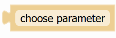
Gets the specified parameter name as input.
Assemblies Only
Set Component Parameter Attribute
Used to set a component parameter, specify the component, parameter, parameter attribute and the value.

Get Component Parameter Attribute
Used to get a component parameter, specify the component, parameter, parameter attribute and the value.
