View-Dependent Particle Resolution Example
Description
The following example shows a possible way to control the resolution of particles based on the distance to a camera.
Can Be Used With:
Should be used in a Script_Operator.
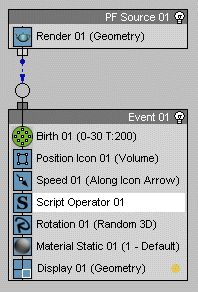
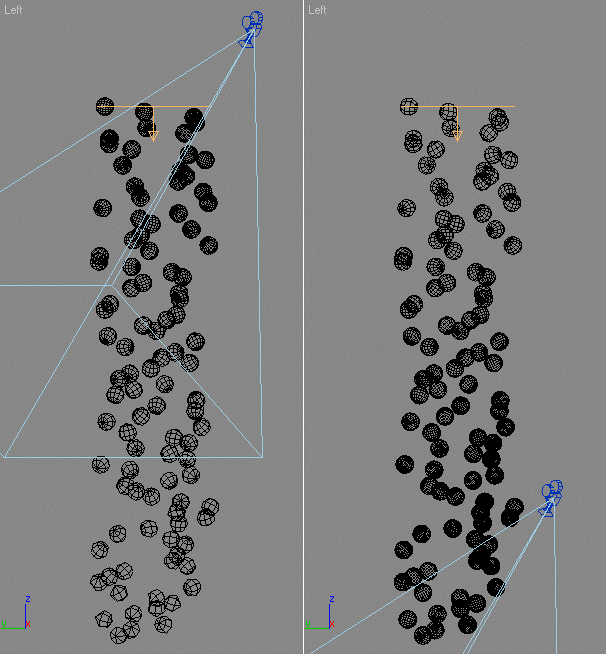
Effect:
The script uses a Sphere primitive from the scene as the shape of every particle and sets its segments based on the distance to a hard-coded camera $Camera001. As particles get farther from the camera, they get less polygons.
EXAMPLE
   --The ChannelsUsed handler defines the channels
   --to be made available to the script.
   --For the list of all channels, see
   --Interface: MaxscriptParticleContainer
   --The parameter pCont passed to the handler
   --contains the Particle Container the script is applied to
   on ChannelsUsed pCont do
   (
       pCont.useShape = true --Enable the Shape channel
       pCont.usePosition = true --Enable the Position channel
       pCont.useScale = true --Enable the Scale channel
   )
   --The Init handler is called on initialization.
   --In this case, it is used to define and, if necessary, create
   --the source of particle shapes
   on Init pCont do
   (
       -- Get the shape source primitive by name.
       -- Use random name to avoid conflict with other objects in the scene
       global sph = $SphereDynamic2468975

       -- In case the object does not exist, create it
       if sph == undefined then
       (
           sph = Sphere()
           -- Give the object a unique name
           sph.name ="SphereDynamic2468975"
           -- Set the radius to one.
           sph.radius = 1.0
           -- Hide the Sphere
           hide sph
       )
   )

   --The Proceed handler contains the main script
   --applied to the Particles.
   --The parameter pCont passed to the handler
   --contains the Particle Container the script is applied to:
   on Proceed pCont do
   (
       --If there is a camera named Camera001 in the scene...
       if $Camera001 != undefined then
       (
           --Get the current total particles count:
           count = pCont.NumParticles()

           --Loop through all particles:
           for i in 1 to count do
           (

               --Set the current particle index:
               pCont.particleIndex = i

               --Modify the pre-created sphere with radius
               --based on the particle size:
               sph.radius = pCont.particleScale

               --Modify segments based on the distance to the camera
               --called $Camera01
               --At distance of 500.0 units the segments will be set to 2
               --At distance of 250.0 the segments will be 4, at 100 units 10 etc.
               --Change the function to get the desired falloff
               sph.segs = 1000.0/(length (pCont.particlePosition - $Camera01.pos))

               --Set the shape of the particle to the TriMesh of the Sphere
               pCont.particleShape = sph.mesh
           )--end i loop
       )--end if
   )--end proceed

   --The Release handler is used to do cleanup work.
   --Not used in this case.
   on Release pCont do
   (
   )