Projection : Modifier
Projection - superclass: modifier; super-superclass:MAXWrapper -31:0 - classID: #(376188956, 435752009)
The Projection modifier lets yout project data such as mapping coordinates, vertex colors and Material IDs from one geometry object onto another. It is typically used in conjunction with Normal Mapping, but has a much larger number of possible applications.
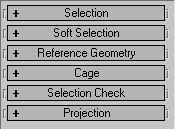
Constructor
Projection...Properties
SelectionRollout
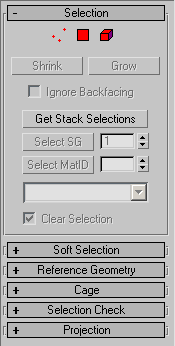
<Projection>.ignoreBackfacing BooleanClass default: false -- boolean; Ignore_BackfacingGet/Set the state of the "Ignore Backfacing" checkbox.
<Projection>.smoothGroup Integer default: 1 -- integer; Smoothing_GroupGet/Set the "Select SG" value. This is the smoothing group number (1-32) to select by.
<Projection>.materialID Integer default: 1 -- integer; Material_IDGet/Set the "Select MatID" value. This is the material ID to select by.
<Projection>.clearSelection BooleanClass default: true-- boolean; Clear_SelectionGet/Set the state of the "Clear Selection" checkbox. When checked, the previous selection will be cleared.
Related Methods:
For related methods, see Projection Modifier-Selection Rollout Methods
Soft SelectionRollout
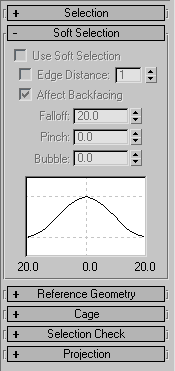
<Projection>.useSoftSelection BooleanClass default: false-- boolean; Use_Soft_SelectionGet/Set the state of the "Use Soft Selection" checkbox.
<Projection>.softselUseEdgeDistance BooleanClass default: false-- boolean; Use_Edge_DistanceGet/Set the state of the "Edge Distance" checkbox.
<Projection>.softselEdgeDist Integer default: 1 -- integer; Edge_DistanceGet/Set the "Edge Distance" value as integer.
<Projection>.softselAffectBackfacing BooleanClass default: true-- boolean; Affect_BackfacingGet/Set the state of the "Affect Backfacing" checkbox.
<Projection>.softselFalloff Float default:20.0 -- world units; FalloffGet/Set the Soft Selection "Falloff" value.
<Projection>.softselPinch Floatdefault: 0.0 -- float; PinchGet/Set the Soft Selection "Pinch" value.
<Projection>.softselBubble Float default: 0.0 -- float; BubbleGet/Set the Soft Selection "Bubble" value.
ReferenceGeometryRollout
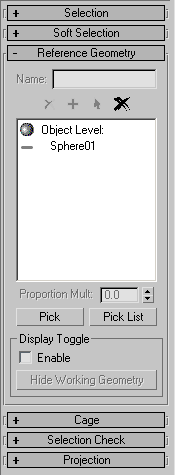
<Projection>.geomNames ArrayParameter default: #() -- string array; Geometry_Selection_Names; Read-onlyContains geometry selection names. Read-only!
<Projection>.geomNodeIDs ArrayParameter default: #() -- int array; Node_ID; Read-onlyContains the geometry selection IDs. Read-only!
<Projection>.geomNodes ArrayParameter default: #() -- node array; Geometry_Nodes; Read-onlyContains the geometry selections nodes. Read-only!
<Projection>.IDs ArrayParameter default: #() -- int array; SO_IDs; Read-onlyContains the sub-object IDs. Read-only!
<Projection>.mapProportions ArrayParameter default: #() -- float array; Map_Proportions; Read-onlyContains an array of Map Proportions. Read-only!
<Projection>.projectionTypes ArrayParameter default: #() -- max object array; Projection_Types; Read-onlyContains an array of Projection Types. Read-only!
<Projection>.selLevels ArrayParameter default: #() -- int array; Selection_Levels; Read-onlyContains an array of Selection Levels. Read-only!
<Projection>.MapChannel Integer default: 1 -- integer; Map_Channel
<Projection>.geomNodeVisible ArrayParameter default: #() -- int array; Node_Visible
Contains an array of visibility flags.
Available in 3ds Max 8 and higher.
<Projection>.displayToggleEnable BooleanClass default: false -- booleanControls the state of the Enable checkbox in the Display Toggle group of controls.
Available in 3ds Max 8 and higher.
<Projection>.displayToggleMode Integer default: 1 -- integerAvailable in 3ds Max 8 and higher.
CageRollout
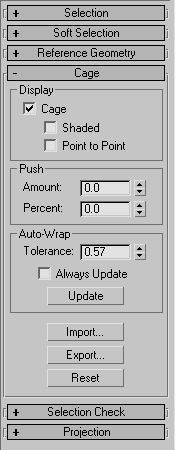
<Projection>.displayCage BooleanClass default: true -- boolean; Display_CageGet/Set the state of the "Cage" checkbox. When true, the cage will be displayed.
<Projection>.displayCageShaded BooleanClass default: false -- boolean; Display_Cage_ShadedGet/Set the state of the "Shaded" checkbox. When true, the cage will be shaded.
<Projection>.displayCageOffset BooleanClass default: false -- boolean; Display_Cage_OffsetGet/Set the state of the "Point to Point" checkbox. When true, the projection vectors along the offset will be displayed.
<Projection>.pushValue Float default: 0.0 -- world units;Push_ValueGet/Set the Push "Amount" value.
<Projection>.pushPercent Float default: 0.0 -- float; Push_PercentageGet/Set the Push "Percent" value.
<Projection>.autoWrapTolerance Float default: 0.0 -- world units; Auto_Wrap_ToleranceGet/Set the Auto-Wrap "Tolerance" value.
<Projection>.autoWrapAlwaysUpdate BooleanClass default:false-- boolean; Auto_Wrap_Always_UpdateGet/Set the state of the Auto-Wrap "Always Update" checkbox.
Related Methods:
For related methods, see Projection Modifier-Cage Rollout Methods
Selection CheckRollout
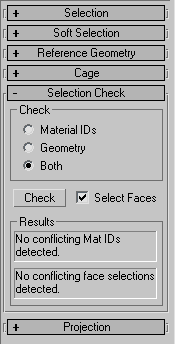
<Projection>.selectionCheckType Integer default: 2 --integer; Selection_Check_TypeGet/Set the selection of the Check radio buttons. Possible values are:
0 - Material ID
1 - Geometry
2 - Both (default)
<Projection>.selectionCheckSelFaces BooleanClass default: true -- boolean; Show_Selection_Check_FacesGet/Set the state of the "Selected Faces" checkbox. When true, only selected faces will be checked.
Related Methods:
For related methods, see Projection Modifier-Selection Check Rollout Methods
Projection Rollout
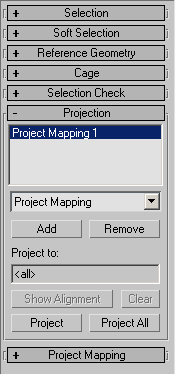
No properties exposed.
For related methods, see Projection Modifier-Projection Rollout Methods
Projection interfaces
Interface:projectionModOpsThe projectionModOps interface is a Mixin interface exposed by the Projection modifier itself.Any interfaces of the modifier will be searched for the method name, thus allmethods below are visible as methods exposed bythe Projection modifier itself.
<Projection>.shrinkSelection()and
<Projection>.projectionModOps.shrinkSelection()are equivalent.
FOR EXAMPLE
   --assuming a cylinder has been applied a projection modifier:
   theProjMod = $Cylinder01.modifiers[#Projection]--get the modifier
   theProjMod.projectionModOps.shrinkSelection()--shrink selection
   theProjMod.growSelection()--grow selection -also works
Methods
Selection Rollout
<void>shrinkSelection()Shrinks the selection. Corresponds to pressing the "Shrink" button in the Selection rollout.
<void>growSelection()Grows the selection. Corresponds to pressing the "Grow" button in the Selection rollout.
<void>selectBySG <integer>sgSelects by Smoothing Group. Corresponds to pressing the "Select SG" button in the Selection rollout.
<void>selectByMtlID <integer>idSelects by Material ID. Corresponds to pressing the "Select MatID" button in the Selection rollout.
Geometry Selection Rollout
<boolean>isValidObject <node>nodeReturns true if the node is a valid projection object.
<boolean>addObjectNode <node>nodeAdds the given node to the Geometry Selection list.
<void>deleteAll()Deletes all objects. Corresponds to pressing the "Delete All" icon.
<integer>numObjects()Returns the number of objects in the Geometry Selection list.
<node>getObjectNode <index>objIndexReturns the node corresponding to the indexed object on the Geometry Selection list.
<string>getObjectName <index>objIndexReturns the name of the indexed object on the Geometry Selection list.
<enum>getObjectSelLevel <index>objIndex
getObjectSelLevel enums:{#object|#vertex|#face|#element)
Returns the selection level of the indexed object on the Geometry Selection list.
<boolean>getObjectSelFaces <node>node <index>objIndex <&bitArray>faces
faces is Out parameter
Returns the selected faces of the specified node and indexed objectinto the by-reference bitArray. The method itself returns true on success, false otherwise.
<integer>getObjectMtlIds <node>node <index>objIndex <&integer array>mtlIDs
mtlIDs is Out parameter
Returns the Material IDs of the specified node and indexed object into the by-reference Array of integers.
<void>deleteObjectNode <index>objIndexDeletes the indexed object from the Geometry Selection list.
<integer>numGeomSels()Returns the number of objects in the Geometry Selection list.
<string>getGeomSelName <index>selIndexReturns the name of the indexed selection.
<enum>getGeomSelLevel <index>selIndex
getGeomSelLevel enums: {#object|#vertex|#face|#element)
Returns selection level of the the indexed selection.
<integer>numGeomSelNodes <index>selIndexReturns the number of geometry selection nodes with the given selection index.
<node>getGeomSelNode <index>selIndex <index>nodeIndexReturns the scene node corresponding to the indexed node and indexed selection.
<boolean>getGeomSelFaces <node>node <index>selIndex <&bitArray>faces
faces is Out parameter
Returnsthe face selection of the given scene node and the indexed selection in the by-reference bitArray. The method itself returns true on success, false otherwise.
<integer>getGeomSelMtlIds <node>node <index>selIndex <&integer array>mtlIDs
mtlIDs is Out parameter
Returns the Material IDs of the given scene node and the indexed selection in the by-reference Array of Integers.
<float>getGeomSelMapProportion <index>selIndexReturns the Map Proportion value of the indexedgeometryselection.
<void>SetGeomSelMapProportion <index>selIndex <float>proportionSets the Map Proportion value of the indexedgeometryselection to the supplied float value.
<void>deleteGeomSel <index>selIndexDeletes the indexed geometry selection.
<void>deleteGeomSelNode <index>selIndex <index>nodeIndexDeletes the indexed node from the indexed geometry selection .
<float>getGeomSelFaceArea <node>node <index>selIndexReturns the face area of the indexed geometry selection of the given node.
<void>setGeomSelNodesVisibility <boolean>visibleSets the visibility of the current Geometry Selection node to the given boolean value. Corresponds to pressing the visibility icon in the Geometry Selection list.
<boolean>getGeomSelNodesVisibility()Cage Rollout
<void>autowrapCage()Performs a Cage Auto-Wrap. Corresponds to pressing the "Update" button in the Auto-Wrap group of controls.
<void>resetCage()Resets the Cage. Corresponds to pressing the "Reset" button in the Auto-Wrap group of controls.
<void>pushCage <float>amountPushes the cage by the given amount. Corresponds to chaning the Amount value in the Push group of controls.
<boolean>importCage <node>importNodeImports the cage from the specified node.Available in 3ds Max 2008and higher.
<boolean>exportCage <string>exportNodeNameExports the cage as a new node with the given name.
Available in 3ds Max 2008 and higher.
Selection Check Rollout
<integer>checkDuplicateMatIDs <node>node <&bitArray>dupFaces
dupFaces is Out parameter
Performs a check for duplicated Material IDs and returns a bitarray in the by-reference argument containing the offending faces.
The method itself returns the number of offending faces as integer.
<integer>checkDuplicateSels <node>node <&bitArray>dupFaces
dupFaces is Out parameter
Performs a check for duplicated Selections and returns a bitarray in the by-reference argument containing the offending faces.
The method itself returns the number of offending faces as integer.
Projection Rollout
<integer>numProjectionTypes()Returns the number of projections currently on the Projection list.
<void>removeProjectionType <index>ptIndexRemoves the indexed Projection Type from the Projection list.
<void>projectProjectionType <index>ptIndexPerforms the projection using the the indexed Projection Type from the Projection list. Similar to pressing the "Project" button.
<void>projectAll()Projects all.Corresponds to pressing the "Project All" button.
<integer>numRegisteredProjectionTypes()Returns the number of available Projection types.Currentlythere is only one type implemented.
<maxObject>getProjectionType <index>ptIndexReturns the indexed Projection object.Currentlythere is only one type implemented :Project_Mapping : ReferenceTarget
<void>addRegisteredProjectionType <index>rptIndexAdds a new projection of the indexed type to the Projection list.
<void>getRegisteredProjectionTypeClassID <index>rptIndex <&integerarray>classID
classID is Out parameter
Returns the classID of the indexed projection type into the by-reference variable.
<void>showAlignment()Corresponds to pressing the "Show Alignment" button.
<void>clearAlignment()Corresponds to pressing the "Clear" button.
Related Methods
The following scripted functions are available for easier Project Modifieraccess. They are implemented in the fileProjectionMod.ms
GetPModObjectNames <projectionMod>modifierReturns an array of Geometry Selection names for the given Projection Modifier.
FindPMod <node>sourceReturns thehighestProjection modifierfrom the stackof the supplied node. Returns undefined if there is no Projection modifier applied.
AddPModObjects <array>node_list <boolean>createNew <boolean>deleteAll [objList :<array>]Adds Projection modifierobjectsto thenodes in the array.
If createNew is true, a new modifier is created, otherwise the existing modifier is used.
If deleteOld is true, all previous objects will be deleted from the modifier's geometry selection.
If the optiona objList : parameteris supplied, the Target objects will be added to the list, otherwise the Pick dialog will be displayed to pick Target objects manually.
Returns an array of Projection Modifiers corresponding to the node_list.