Tee : Shape
Tee - superclass: shape; super-superclass:node - 42:7 - classID: #(-85272820, 0)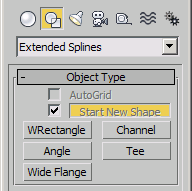
The TeeShape is available in 3ds Max 8 and higher under Create>Shapes>"Extended Splines" and provides an "T" like shape.
Constructor
Tee...Properties
Parameters Rollout
<Tee>.tee_length Float default: 0.0 -- animatable; float; LengthGet/set the Length of the Tee shape.
<Tee>.tee_width Float default: 0.0 -- animatable; float; WidthGet/set the Width of the Tee shape.
<Tee>.tee_thickness Float default: 0.0 -- animatable; float; ThicknessGet/set the Thickness of the Tee shape.
<Tee>.tee_radius Float default: 0.0 -- animatable; float; CornerRadiusGet/set the Corner Radius of the Tee shape.
Interpolation Rollout
<Tee>.steps Integer default: 6 -- integerGet/set the Steps value. This controls the number of subdivisions between two vertices.
<Tee>.optimize BooleanClass default: true -- booleanEnable/Disable the Optimize option. When set to true, removes unneeded steps from straight segments in the spline.
<Tee>.adaptive BooleanClass default: false -- booleanEnable/Disable the Adaptive option. When true, sets the number of steps for each segment to produce a smooth curve. Straight segments always receive 0 steps.
Creation Method Rollout
<Tee>.typeIn_creationMethod BooleanClass default: false -- boolean; Creation_MethodControls the creation method when using the Keyboard Entry controls. Possible values are:
false:Edge
true:Center
Keyboard Entry Rollout
<Tee>.typeIn_x Float default: 0.0 -- float; XGet/set the X type-in value.
<Tee>.typeIn_y Float default: 0.0 -- float; YGet/set the Y type-in value.
<Tee>.typeIn_z Float default: 0.0 -- float; ZGet/set the Z type-in value.
<Tee>.typeIn_Length Float default: 0.0 -- float; TypeInLengthGet/set the Length type-in value.
<Tee>.typeIn_Width Float default: 0.0 -- float; TypeInWidthGet/set the Width type-in value.
<Tee>.typeIn_Thickness Float default: 0.0 -- float; TypeInThicknessGet/set the Thickness type-in value.
<Tee>.typeIn_Radius Float default: 0.0 -- float; TypeInRadiusGet/set the Corner Radius type-in value.
Rendering Rollout
<Tee>.render_renderable BooleanClass default: false -- boolean; renderableControls the state of the "Enable in Renderer" checkbox. When set to true, the spline will be rendered by the production renderer.
<Tee>.render_displayRenderMesh BooleanClass default: false -- boolean; displayRenderMeshControls the state of the "Enable In Viewport" checkbox. When set to true, the spline's mesh will be displayed in the viewports.
<Tee>.render_useViewportSettings BooleanClass default: false -- boolean; useViewportSettingsControls the state of the "Use Viewport Settings" checkbox. When set to true, the mesh displayed in the viewport will use the Viewport settings. When false, the Renderer settings will be used for the viewport mesh, too.
<Tee>.render_mapcoords BooleanClass default: false -- boolean; mapcoordsToggles mapping coordinates generation on and off. The U coordinate wraps once around the thickness of the spline; the V coordinate is mapped once along the length of the spline.
<Tee>.render_displayRenderSettings BooleanClass default: true -- boolean; displayRenderSettingsToggles the state of the Viewport/Renderer radio buttons. When set to true, the Renderer settings will be displayed in the rollout. When false, the Viewport settings will be shown instead.
<Tee>.realWorldMapSize BooleanClass default: false -- booleanToggles the real-world map size option on and off.
<Tee>.render_rectangular BooleanClass default: false -- booleanWhen set to true, enables the Rectangular cross-section mode to be used in the renderer. When false (default), enables the Radial cross-section mode. Corresponds to the Radial/Rectangular radio buttons in the UI in Renderer mode.
<Tee>.render_viewport_rectangular BooleanClass default: false -- booleanWhen set to true, enables the Rectangular cross-section mode to be used in the viewports. When false (default), enables the Radial cross-section mode. Corresponds to the Radial/Rectangular radio buttons in the UI in Viewport mode.
Renderer - Radial Cross-Section
<Tee>.render_thickness Float default: 1.0 -- animatable
<Tee>.thickness Float default: 1.0 -- animatable; float
Get/Set the diameter of the Radial renderable spline mesh.
<Tee>.render_sides Integer default: 12 -- animatable
<Tee>.sides Integer default: 3 -- integer
Get/Set the number of sides for the spline mesh in the renderer. A value of 4 will give you a square cross section, for example.
<Tee>.render_angle Float default: 0.0 -- animatable
<Tee>.angle Float default: 0.0 -- float
Get/Set therotational position of the Radial cross-section in the renderer.
Renderer - Rectangular Cross-Section
<Tee>.render_length Float default: 6.0 -- animatableGet/Set the length of the Rectangular renderable spline mesh.
<Tee>.render_width Float default: 2.0 -- animatableGet/Set the width of the Rectangular renderable spline mesh.
<Tee>.render_angle2 Float default: 0.0 -- animatableGet/Set rotational position of the Rectangular cross-section in the renderer.
<Tee>.render_aspect_locked BooleanClass default: false -- booleanControls the state of the Aspect Lock checkbutton. When set to true, changing the Width will affect the Height and vice-versa, preserving the aspect at the time the lock was engaged.
Viewport - Radial Cross-Section
<Tee>.render_viewport_angle Float default: 0.0 -- float; viewport_angleGet/Set the diameter of the Radial renderable spline mesh in the viewport.
<Tee>.render_viewport_sides Integer default: 12 -- integer; viewport_sidesGets/Sets the number of sides for the Radial spline mesh in the viewports. A value of 4 will give you a square cross section, for example.
<Tee>.render_viewport_thickness Float default: 1.0 -- float; viewport_thicknessGets/Sets the rotational position of the cross-section in the viewports.
Viewport - Rectangular Cross-Section
<Tee>.render_viewport_length Float default: 6.0 -- floatGet/Set the length of the Rectangular spline mesh in the viewports.
<Tee>.render_viewport_width Float default: 2.0 -- floatGet/Set the width of the Rectangular spline mesh in the viewports.
<Tee>.render_viewport_angle2 Float default: 0.0 -- floatGet/Set rotational position of the Rectangular cross-section in the viewports.
<Tee>.render_viewport_aspect_locked BooleanClass default: false -- booleanControls the state of the Aspect Lock checkbutton. When set to true, changing the Width will affect the Height and vice-versa, preserving the aspect at the time the lock was engaged.
Auto Smooth
<Tee>.render_auto_smooth BooleanClass default: true -- booleanControls the state of the Auto Smooth checkbox. When set to true, auto smoothing will be enabled.
<Tee>.render_threshold Floatdefault: 40.0 -- animatable;Get/Set auto smoothing angle threshold.